Topics, Partitions & Offsets
How Kafka organises data. Why topics are split into partitions, how message keys decide the partition and keep ordering, how offsets work, and how retention and compaction clean up.
The big idea
A supermarket with one checkout lane is simple, but slow. With eight lanes, eight customers are served at once. The catch: customers in different lanes can finish in any order; only customers in the same lane keep their order.
A Kafka topic is the store; its partitions are the checkout lanes.
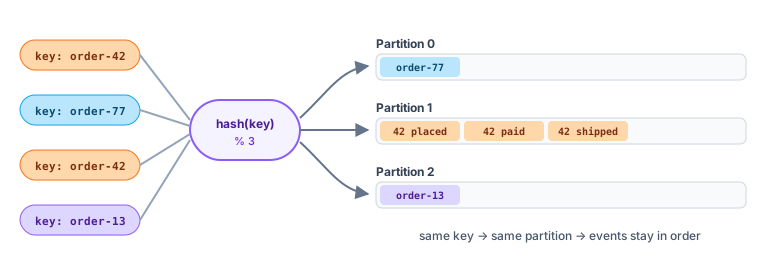 A topic split into partitions; the message key decides the lane
Topics
A topic is a named stream of related events: orders, payments, page-views, user-signups.
kafka-topics.sh --create --topic orders --partitions 6 --replication-factor 3 --bootstrap-server localhost:9092
Naming tips: use a consistent scheme such as <domain>.<entity>.<event>: shop.orders.placed, shop.payments.completed.
Partitions: the unit of parallelism
Each partition is an ordered, append-only log stored on one broker (plus copies on others). Splitting a topic into partitions lets Kafka:
- Spread the data across many brokers (a topic can be bigger than one disk).
- Spread the load: writes and reads for different partitions happen on different machines.
- Consume in parallel: each partition can be read by a different consumer in a group.
Offsets: positions in a partition
Every record in a partition gets a sequential offset: 0, 1, 2, 3… Offsets are per partition: partition 0 and partition 1 both have an offset 5, and they're different records.
A record is uniquely identified by (topic, partition, offset).
Keys decide the partition, and the ordering ⭐
When a producer sends a record with a key, Kafka picks the partition by hashing the key:
partition = hash(key) % number_of_partitions
The same key always goes to the same partition, so all events for that key stay in order.
await producer.send({
  topic: "orders",
  messages: [
    { key: "order-42", value: JSON.stringify({ type: "OrderPlaced" }) },
    { key: "order-42", value: JSON.stringify({ type: "OrderPaid" }) },     // same partition, after Placed
    { key: "order-42", value: JSON.stringify({ type: "OrderShipped" }) },  // same partition, after Paid
    { key: "order-77", value: JSON.stringify({ type: "OrderPlaced" }) },   // maybe a different partition
  ],
});
| Situation | Ordering |
|---|---|
| Same key | ✅ Guaranteed in order |
| Different keys | ❌ No ordering between them |
| No key | ❌ Spread for balance; no ordering |
💡 Choose the key = the entity whose events must stay in order: order ID, account ID, user ID. Ordering across the whole topic is only possible with a single partition, which kills parallelism.
Watch out for hot partitions
If one key is far more active than others (one mega-seller, one celebrity), its partition gets overloaded while others sit idle. Pick keys with many distinct, evenly active values.
How many partitions?
- Partitions = the maximum number of consumers in a group that can work in parallel.
- A common starting point: estimate target throughput ÷ throughput per consumer, then add headroom.
- You can increase partitions later, but it changes which partition each key maps to, breaking per-key ordering for existing keys. So plan ahead; you cannot decrease them.
Retention: how long records live
Kafka doesn't delete records when they're read. It deletes them based on retention policy:
| Setting | Meaning | Example |
|---|---|---|
retention.ms | Delete records older than this | 604800000 (7 days, the default) |
retention.bytes | Delete the oldest once a partition exceeds this size | 10 GB |
retention.ms=-1 | Keep forever | Event sourcing, audit logs |
Under the hood, each partition is stored as segment files; whole old segments are deleted at once, which is very cheap.
Log compaction: keep the latest per key
For some topics you only care about the latest value for each key, like a user's current email address. Compaction removes older records with the same key, keeping at least the newest one.
kafka-configs.sh --alter --entity-type topics --entity-name user-profiles \
  --add-config cleanup.policy=compact --bootstrap-server localhost:9092
A record with a key and a null value is a tombstone: it tells compaction to delete that key entirely. Compacted topics are great for restoring state (Kafka itself stores consumer offsets in a compacted topic, __consumer_offsets).
Key takeaways
- A topic is a named stream; it's split into partitions for scale and parallelism.
- Each partition is an ordered log; records have per-partition offsets.
- The key decides the partition: same key → same partition → guaranteed order.
- Partition count caps consumer parallelism; you can add partitions but it remaps keys.
- Retention deletes old records by time or size; compaction keeps the latest value per key.