Kubernetes Cluster Architecture
What's inside a cluster. The control plane (API server, etcd, scheduler, controllers) and the worker nodes (kubelet, container runtime, kube-proxy), and what happens when you run kubectl apply.
The big idea
A restaurant chain:
- Head office (the control plane) decides what should happen: menus, how many cooks each branch needs, where new staff go. It keeps the official records.
- Branches (the worker nodes) do the actual cooking. Each branch has a manager (the kubelet) who takes instructions from head office and makes sure the kitchen follows them.
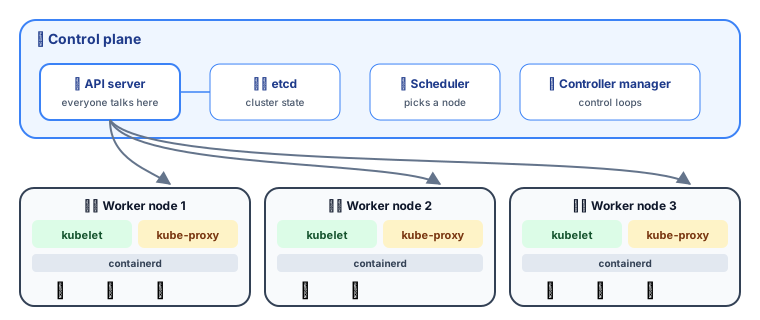 A Kubernetes cluster: the control plane and worker nodes
The control plane (the brain)
| Component | Role | Analogy |
|---|---|---|
| kube-apiserver | The front door. Every command (kubectl, controllers, nodes) goes through its REST API. Validates and stores objects | Head office reception |
| etcd | A distributed key-value database holding the entire cluster state | The official records vault |
| kube-scheduler | Picks which node each new pod should run on | HR deciding which branch gets a new cook |
| kube-controller-manager | Runs control loops (Deployment, ReplicaSet, Node, Job controllers…) that push actual state toward desired state | Managers checking "do we have enough staff?" |
| cloud-controller-manager | Talks to the cloud provider: load balancers, disks, node lifecycle | Facilities team dealing with landlords |
⚠️ etcd is the heart. Lose etcd without a backup and you've lost the cluster's entire configuration. Managed Kubernetes services back it up for you.
Worker nodes (the muscle)
| Component | Role |
|---|---|
| kubelet | The node agent. Watches the API server for pods assigned to its node, starts them via the container runtime, and reports their health |
| Container runtime | Actually runs containers: containerd or CRI-O (Docker images work fine; Docker itself isn't required) |
| kube-proxy | Programs networking rules so traffic to a Service reaches the right pods |
| CNI plugin | Gives every pod its own IP and connects pods across nodes (Calico, Cilium, Flannel, cloud CNIs) |
What happens on kubectl apply? ⭐
Notice: nobody talks to anybody directly except through the API server, and every component watches for changes and reacts. That's what makes Kubernetes so extensible and resilient.
How the scheduler chooses a node
Things that influence scheduling:
- Resource requests (CPU/memory the pod asks for).
- nodeSelector / node affinity: "run only on nodes with a GPU".
- Pod affinity / anti-affinity: "keep replicas of this app on different nodes".
- Taints and tolerations: "this node is reserved for databases, unless a pod tolerates it".
Talking to a cluster: kubectl
kubectl config get-contexts         # which clusters can I talk to?
kubectl config use-context prod-eu  # switch cluster
kubectl get nodes -o wide           # list worker nodes
kubectl cluster-info                # API server address
kubectl api-resources               # every object type the cluster understands
kubectl reads the cluster address and your credentials from ~/.kube/config.
Namespaces: virtual clusters
A namespace is a folder inside the cluster that groups resources and scopes names, permissions and quotas.
kubectl create namespace team-shop
kubectl get pods -n team-shop
kubectl get pods --all-namespaces
Common uses: one namespace per team or per environment (dev, staging), with ResourceQuotas and RBAC permissions per namespace.
Managed vs self-hosted
| Managed (EKS, GKE, AKS) | Self-hosted (kubeadm, bare metal) | |
|---|---|---|
| Control plane | Run, patched and backed up by the cloud | You run it all |
| Upgrades | A button or a command | Careful manual process |
| Cost | A small fee + nodes | "Free" + a lot of your time |
| Best for | Almost everyone ✅ | Special compliance or on-prem needs |
For learning on your laptop: kind, minikube, k3d, or Docker Desktop's built-in Kubernetes.
Key takeaways
- The control plane (API server, etcd, scheduler, controllers) decides and records; worker nodes (kubelet, runtime, kube-proxy) run the pods.
- Everything goes through the API server; components watch and react through control loops.
- etcd stores the whole cluster state. Back it up.
- The scheduler filters and scores nodes using resource requests, affinity and taints.
- Namespaces group resources for teams and environments.