Pods
The smallest thing Kubernetes runs. What a pod is, why it can hold several containers, the pod lifecycle, sidecars and init containers, resource requests and limits, and debugging pods.
The big idea
Think of a pod as a shared apartment. The roommates (containers) share the same address (IP), the same front door (network ports), and can share a storage cupboard (volumes). They move in and out together.
Most pods have one main container. Sometimes a helper lives with it, like a roommate who handles the mail.
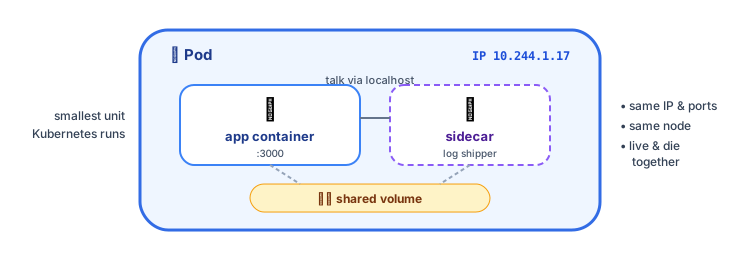 A pod: one or more containers sharing a network address and volumes
Your first pod
# pod.yaml
apiVersion: v1
kind: Pod
metadata:
  name: hello
  labels:
    app: hello
spec:
  containers:
    - name: web
      image: nginx:1.27
      ports:
        - containerPort: 80
kubectl apply -f pod.yaml
kubectl get pods                    # NAME   READY   STATUS    RESTARTS   AGE
                                    # hello  1/1     Running   0          10s
kubectl port-forward pod/hello 8080:80   # open http://localhost:8080
kubectl delete pod hello
⚠️ You rarely create pods directly. A bare pod that dies stays dead. In practice you create a Deployment (next lesson), which creates and replaces pods for you.
What containers in a pod share
| Shared | Meaning |
|---|---|
| Network | One IP address per pod; containers talk via localhost |
| Volumes | Mounted storage both containers can read and write |
| Lifecycle | Scheduled on the same node, started and stopped together |
Each pod gets its own IP, and every pod can reach every other pod's IP across the cluster (the flat pod network, provided by the CNI plugin).
Multi-container patterns
Sidecar
A helper container that extends the main one without changing it.
Common sidecars: log shippers, service-mesh proxies (Envoy in Istio), config reloaders, metrics exporters.
Init containers
Run before the main containers start, to completion, one after another. Great for setup work.
spec:
  initContainers:
    - name: wait-for-db
      image: busybox:1.36
      command: ["sh", "-c", "until nc -z postgres 5432; do echo waiting for db; sleep 2; done"]
    - name: migrate
      image: registry.example.com/shop-api:1.8.0
      command: ["npm", "run", "migrate"]
  containers:
    - name: api
      image: registry.example.com/shop-api:1.8.0
The pod lifecycle
| Status you'll see | What it usually means |
|---|---|
Pending | No node has enough resources, or the image is still downloading |
ContainerCreating | Pulling the image, mounting volumes |
Running | At least one container is running |
CrashLoopBackOff | The container keeps crashing; Kubernetes waits longer and longer between restarts |
ImagePullBackOff / ErrImagePull | Wrong image name or tag, or no permission to pull it |
OOMKilled | The container used more memory than its limit |
Completed | The container finished successfully (typical for Jobs) |
Resource requests and limits ⭐
Tell Kubernetes how much CPU and memory each container needs:
containers:
  - name: api
    image: registry.example.com/shop-api:1.8.0
    resources:
      requests:          # guaranteed minimum, used for SCHEDULING
        cpu: "250m"      # 0.25 of a CPU core
        memory: "256Mi"
      limits:            # maximum allowed
        cpu: "1"
        memory: "512Mi"
| Requests | Limits | |
|---|---|---|
| Purpose | The scheduler places the pod on a node that has this much free | A hard cap at runtime |
| Exceed CPU | – | The container is throttled (slowed down) |
| Exceed memory | – | The container is killed (OOMKilled) and restarted |
💡 Always set requests (otherwise scheduling is guesswork), and always set a memory limit. Many teams skip CPU limits to avoid throttling, but keep CPU requests accurate.
Debugging pods: the essential commands
kubectl get pods -o wide                   # status, node, IP
kubectl describe pod shop-api-7d9f-xk2p    # events at the bottom explain most problems!
kubectl logs shop-api-7d9f-xk2p            # container logs
kubectl logs shop-api-7d9f-xk2p --previous # logs from the crashed previous run
kubectl logs shop-api-7d9f-xk2p -c sidecar # a specific container
kubectl exec -it shop-api-7d9f-xk2p -- sh  # shell inside the container
kubectl get events --sort-by=.lastTimestamp
Key takeaways
- A pod is one or more containers sharing an IP, ports and volumes; it's the smallest unit Kubernetes schedules.
- Don't create bare pods for apps; use Deployments, which replace pods automatically.
- Sidecars extend the main container; init containers do setup before it starts.
- Set requests (for scheduling) and limits (caps); exceeding memory →
OOMKilled. kubectl describeandkubectl logs --previoussolve most pod mysteries.