Helm, kubectl Cheat Sheet & Best Practices
Package apps with Helm, deploy with GitOps, secure clusters with RBAC, and keep a kubectl cheat sheet at hand. Plus a production checklist for every workload.
Part 1: Helm, the package manager
The big idea
Installing an app by hand means writing a Deployment, a Service, an Ingress, a ConfigMap, a Secret, an HPA… and copying them all for each environment with small changes. Helm is like npm for Kubernetes: it packages those YAML files into a chart with templates and values, so you can install, upgrade and roll back with one command.
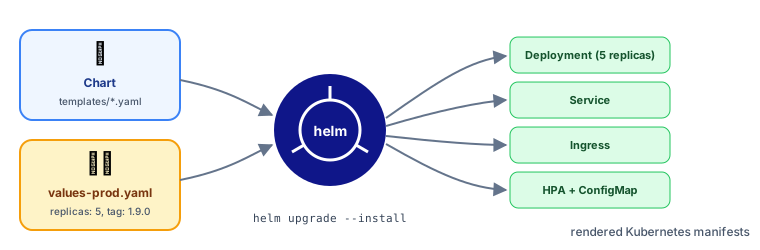 Helm: a chart plus values renders into Kubernetes manifests
| Helm term | Meaning | npm analogy |
|---|---|---|
| Chart | A package of templated Kubernetes YAML | A package |
| Values | Settings that fill the templates (values.yaml) | Config options |
| Release | One installed instance of a chart | An installed dependency |
| Repository | Where charts are published | The npm registry |
Using existing charts
helm repo add bitnami https://charts.bitnami.com/bitnami
helm install my-redis bitnami/redis --namespace cache --create-namespace --set auth.enabled=true
helm list -A
helm upgrade my-redis bitnami/redis -f my-redis-values.yaml
helm rollback my-redis 1
helm uninstall my-redis -n cache
Your own chart
shop-api/
├── Chart.yaml          # name, version
├── values.yaml         # defaults
├── values-prod.yaml    # production overrides
└── templates/
    ├── deployment.yaml
    ├── service.yaml
    ├── ingress.yaml
    └── hpa.yaml
# templates/deployment.yaml (excerpt)
apiVersion: apps/v1
kind: Deployment
metadata:
  name: {{ .Release.Name }}
spec:
  replicas: {{ .Values.replicaCount }}
  template:
    spec:
      containers:
        - name: api
          image: "{{ .Values.image.repository }}:{{ .Values.image.tag }}"
          resources:
            {{- toYaml .Values.resources | nindent 12 }}
# values.yaml                         # values-prod.yaml
replicaCount: 1                       # replicaCount: 5
image:                                # image:
  repository: registry.example.com/shop-api
  tag: "1.9.0"                        #   tag: "1.9.0"
resources:                            # resources:
  requests: { cpu: 100m, memory: 128Mi }  #   requests: { cpu: 500m, memory: 512Mi }
helm upgrade --install shop-api ./shop-api -f values-prod.yaml -n prod
helm template ./shop-api -f values-prod.yaml   # render locally to inspect the YAML
Alternative: Kustomize (built into kubectl apply -k) layers plain-YAML patches per environment instead of templates. Simpler for small differences; Helm is better for distributing reusable packages.
Part 2: GitOps
Instead of running kubectl apply from laptops, the desired state lives in git, and an operator in the cluster (Argo CD or Flux) continuously syncs the cluster to match.
✅ Every change is reviewed and versioned; rollback = git revert; the cluster self-corrects manual drift; and nobody needs production credentials on their laptop.
Part 3: Security basics
RBAC: who can do what
apiVersion: rbac.authorization.k8s.io/v1
kind: Role
metadata: { name: read-pods, namespace: team-shop }
rules:
  - apiGroups: [""]
    resources: ["pods", "pods/log"]
    verbs: ["get", "list", "watch"]
---
apiVersion: rbac.authorization.k8s.io/v1
kind: RoleBinding
metadata: { name: devs-read-pods, namespace: team-shop }
subjects: [{ kind: Group, name: shop-developers }]
roleRef: { kind: Role, name: read-pods, apiGroup: rbac.authorization.k8s.io }
Role + RoleBinding apply within a namespace; ClusterRole + ClusterRoleBinding apply cluster-wide. Follow least privilege.
Pod security essentials
securityContext:
  runAsNonRoot: true
  runAsUser: 10001
  allowPrivilegeEscalation: false
  readOnlyRootFilesystem: true
  capabilities: { drop: ["ALL"] }
Plus: scan images, pull only from trusted registries, use NetworkPolicies, keep Secrets in a vault, and enforce the Pod Security Standards (restricted profile) per namespace.
Part 4: kubectl cheat sheet
| Task | Command |
|---|---|
| Apply YAML | kubectl apply -f app.yaml / -f dir/ / -k overlay/ |
| List things | kubectl get pods,svc,deploy -n team-shop -o wide |
| Watch live | kubectl get pods -w |
| Details + events | kubectl describe pod <name> |
| Logs | kubectl logs <pod> [-c container] [-f] [--previous] |
| Logs of all pods of an app | kubectl logs -l app=shop-api --tail=50 |
| Shell into a container | kubectl exec -it <pod> -- sh |
| Port-forward | kubectl port-forward svc/shop-api 8080:80 |
| Scale | kubectl scale deploy/shop-api --replicas=5 |
| Update image | kubectl set image deploy/shop-api api=repo/shop-api:1.9.1 |
| Rollout status / undo | kubectl rollout status deploy/shop-api / kubectl rollout undo deploy/shop-api |
| Restart pods | kubectl rollout restart deploy/shop-api |
| Resource usage | kubectl top pods / kubectl top nodes |
| Recent events | kubectl get events --sort-by=.lastTimestamp |
| Dry run + diff | kubectl diff -f app.yaml |
| Generate YAML | kubectl create deploy web --image=nginx --dry-run=client -o yaml |
| Explain a field | kubectl explain deployment.spec.strategy |
| Switch namespace | kubectl config set-context --current --namespace=team-shop |
| Drain a node | kubectl drain <node> --ignore-daemonsets |
💡 Handy tools: k9s (a terminal UI), kubectx/kubens (fast context and namespace switching), stern (tail logs from many pods), Lens (a desktop UI).
Part 5: Production checklist for every workload
- At least 2 replicas, spread across nodes and zones
- Readiness and liveness probes (and startup, if boot is slow)
- Resource requests on every container, memory limits set
- HPA configured, and a PodDisruptionBudget
- Graceful
SIGTERMhandling - Image pinned by version (or digest), scanned, pulled from a trusted registry
- Runs as non-root with a restrictive
securityContext - Config in ConfigMaps, secrets from a secret manager
- NetworkPolicy limiting who can reach it
- Logs to stdout in JSON, metrics exposed, alerts defined
- Manifests in git, deployed through GitOps
Key takeaways
- Helm packages Kubernetes YAML as reusable, configurable charts (install, upgrade, rollback); Kustomize patches plain YAML.
- GitOps (Argo CD, Flux) keeps the cluster in sync with git: reviewed, versioned, self-healing deploys.
- Secure with RBAC (least privilege), a restrictive securityContext, NetworkPolicies and a secret manager.
- Keep the kubectl cheat sheet close;
describe,logs --previousandget eventssolve most problems. - Run through the production checklist for every workload.