ConfigMaps, Secrets & Storage
Keep configuration out of your images and data safe when pods die. ConfigMaps, Secrets (and how to handle them safely), volumes, PersistentVolumeClaims and StorageClasses.
Part 1: Configuration
The big idea
A travelling musician carries the same guitar to every venue, but each venue gives them a different set list and sound settings. The guitar is the container image; the set list is the configuration.
Build the image once, configure it per environment. Never bake "staging database URL" into an image.
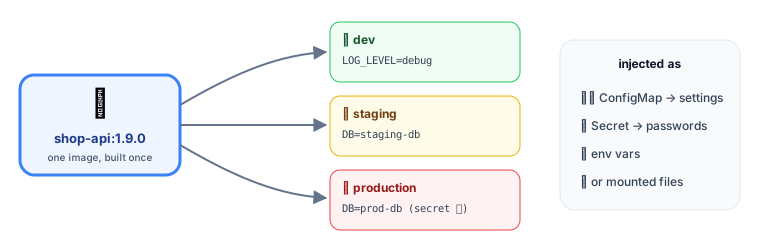 One image, different configuration per environment
ConfigMaps: non-secret settings
apiVersion: v1
kind: ConfigMap
metadata:
  name: shop-api-config
data:
  LOG_LEVEL: "info"
  FEATURE_NEW_CHECKOUT: "true"
  PAYMENTS_URL: "http://payments-api"
  app-settings.json: |
    { "currency": "EUR", "pageSize": 20 }
Use it in a pod as environment variables or as files:
spec:
  containers:
    - name: api
      image: registry.example.com/shop-api:1.9.0
      envFrom:
        - configMapRef: { name: shop-api-config }       # every key → an env var
      env:
        - name: LOG_LEVEL
          valueFrom:
            configMapKeyRef: { name: shop-api-config, key: LOG_LEVEL }  # a single key
      volumeMounts:
        - name: settings
          mountPath: /etc/shop                          # → /etc/shop/app-settings.json
  volumes:
    - name: settings
      configMap: { name: shop-api-config, items: [{ key: app-settings.json, path: app-settings.json }] }
| Mounted as | Updates when the ConfigMap changes? |
|---|---|
| Environment variables | ❌ Only when the pod restarts |
| Files (volume) | ✅ Eventually (within about a minute), if your app re-reads the file |
💡 A common trick: put a hash of the config in a pod annotation, so changing the config triggers a rolling restart. Helm charts often do this.
Secrets: sensitive values
apiVersion: v1
kind: Secret
metadata:
  name: shop-api-secrets
type: Opaque
stringData:                           # plain text here; stored base64-encoded
  DATABASE_URL: "postgres://shop:s3cr3t@postgres:5432/shop"
  STRIPE_API_KEY: "sk_live_…"
envFrom:
  - secretRef: { name: shop-api-secrets }
⚠️ Base64 is not encryption. Anyone who can read the Secret object can decode it in one command. Protect Secrets properly:
| Do | Why |
|---|---|
| Enable encryption at rest for etcd | Secrets are stored encrypted |
| Restrict access with RBAC | Only the apps and people that need them can read them |
| Never commit plain Secret YAML to git | Git history is forever |
| Use External Secrets Operator, Vault or a cloud secret manager | The real values live in a proper vault and are synced in |
| Or Sealed Secrets / SOPS | Encrypted files that are safe to commit |
| Prefer mounting as files over env vars | Env vars leak into logs and crash dumps more easily |
Part 2: Storage
The big idea
Containers are disposable: when a pod is deleted or moves to another node, everything written inside its filesystem is gone. That's perfect for stateless apps, and a disaster for databases.
Kubernetes separates "I need 20 GB of fast disk" (a claim) from "here's an actual disk" (a volume), like booking a hotel room by type instead of by room number.
Volume types at a glance
| Volume | Lives as long as… | Use for |
|---|---|---|
emptyDir | The pod | Scratch space, sharing files between containers in a pod |
configMap / secret | – | Config files and credentials |
hostPath | The node | ⚠️ Rarely: node-level agents only |
| PersistentVolumeClaim | Independent of pods ✅ | Databases, uploads, anything that must survive |
PV, PVC and StorageClass
- PersistentVolume (PV): a real piece of storage (a cloud disk, an NFS share).
- PersistentVolumeClaim (PVC): a pod's request for storage: size, access mode, class.
- StorageClass: a template telling Kubernetes how to create PVs on demand (dynamic provisioning).
apiVersion: v1
kind: PersistentVolumeClaim
metadata:
  name: uploads
spec:
  accessModes: [ReadWriteOnce]
  storageClassName: fast
  resources:
    requests:
      storage: 20Gi
---
# In the pod spec:
#   volumes:
#     - name: uploads
#       persistentVolumeClaim: { claimName: uploads }
#   containers[].volumeMounts:
#     - { name: uploads, mountPath: /app/uploads }
Access modes
| Mode | Meaning | Typical backing |
|---|---|---|
| ReadWriteOnce (RWO) | Mounted read-write by one node | Cloud block disks (EBS, Persistent Disk) |
| ReadOnlyMany (ROX) | Read-only by many nodes | Shared datasets |
| ReadWriteMany (RWX) | Read-write by many nodes | NFS, EFS, Azure Files, CephFS |
| ReadWriteOncePod | Exactly one pod | Strict single-writer workloads |
StatefulSets and storage
A StatefulSet gives each replica its own PVC that follows it across restarts and rescheduling:
volumeClaimTemplates:
  - metadata: { name: data }
    spec:
      accessModes: [ReadWriteOnce]
      storageClassName: fast
      resources: { requests: { storage: 50Gi } }
Pod postgres-1 always gets data-postgres-1 back, even after moving to another node.
Reclaim policy: what happens when the claim is deleted?
- Delete (default for dynamic volumes): the disk is deleted too. ⚠️ Be careful in production.
- Retain: the disk is kept for manual recovery. Safer for important data.
💡 For uploads and user files, object storage (S3, GCS, Azure Blob) accessed through its API is often simpler and more scalable than volumes. It keeps your pods stateless.
Key takeaways
- ConfigMaps hold non-secret config; Secrets hold sensitive values. Both are injected as env vars or files, so one image works everywhere.
- Secrets are only base64-encoded: add encryption at rest, RBAC, and an external secret manager; never commit them.
- Pod filesystems are disposable; use PersistentVolumeClaims for data that must survive.
- StorageClasses create volumes on demand; mind the access modes and reclaim policy.
- StatefulSets give each replica its own persistent volume; object storage keeps pods stateless.