Scaling & Health Probes
Let Kubernetes heal and scale your app automatically. Liveness, readiness and startup probes, graceful shutdown, the HorizontalPodAutoscaler, cluster autoscaling and PodDisruptionBudgets.
Part 1: Health probes
The big idea
A lifeguard watches every swimmer and asks two questions:
- "Are you alive?" If a swimmer is unresponsive, the lifeguard rescues them (liveness → restart).
- "Are you ready to join the relay race?" A swimmer catching their breath sits the next lap out, but is fine (readiness → temporarily removed from traffic).
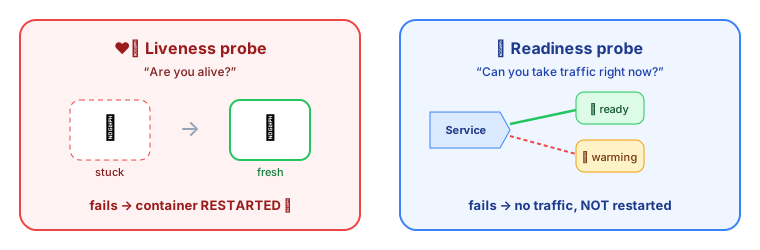 Liveness restarts a stuck container; readiness removes a busy one from traffic
The three probes
| Probe | Question | If it fails… | Typical check |
|---|---|---|---|
| Liveness | Is the process stuck or dead? | 🔁 Container is restarted | /health/live: returns 200 if the event loop responds |
| Readiness | Can it serve traffic right now? | 🚫 Pod is removed from Service endpoints (not restarted) | /health/ready: DB reachable, caches warm |
| Startup | Has a slow app finished starting? | Other probes wait; restarts only after the deadline | For apps that take a long time to boot |
containers:
  - name: api
    image: registry.example.com/shop-api:1.9.0
    ports: [{ containerPort: 3000 }]
    startupProbe:
      httpGet: { path: /health/live, port: 3000 }
      failureThreshold: 30          # up to 30 × 2s = 60s to start
      periodSeconds: 2
    livenessProbe:
      httpGet: { path: /health/live, port: 3000 }
      periodSeconds: 10
      failureThreshold: 3           # restart after ~30s of failures
    readinessProbe:
      httpGet: { path: /health/ready, port: 3000 }
      periodSeconds: 5
      failureThreshold: 2
// Express health endpoints
app.get("/health/live", (req, res) => res.sendStatus(200)); // cheap: "the process responds"

app.get("/health/ready", async (req, res) => {
  try {
    await db.query("SELECT 1");                               // dependencies I truly need
    res.sendStatus(isShuttingDown ? 503 : 200);
  } catch {
    res.sendStatus(503);
  }
});
⚠️ Don't check external dependencies in the liveness probe. If the database goes down and every pod's liveness fails, Kubernetes restarts all your pods at once, which doesn't fix the database and makes recovery harder. Dependencies belong in readiness.
Graceful shutdown
When a pod is terminated (a deploy, scale-down or node drain), Kubernetes sends SIGTERM, removes the pod from endpoints, waits up to terminationGracePeriodSeconds (30 s by default), then sends SIGKILL.
let isShuttingDown = false;
process.on("SIGTERM", () => {
  isShuttingDown = true;                 // readiness now returns 503
  setTimeout(() => {                     // give load balancers a moment to notice
    server.close(() => process.exit(0)); // finish in-flight requests
  }, 5000);
});
Part 2: Autoscaling
The big idea
A supermarket opens more checkout lanes when the queues get long, and closes some when it's quiet. It can also rent a bigger building if even every lane isn't enough.
HorizontalPodAutoscaler (HPA) ⭐
The HPA watches a metric (CPU by default) and adjusts a Deployment's replica count to keep it near a target.
apiVersion: autoscaling/v2
kind: HorizontalPodAutoscaler
metadata:
  name: shop-api
spec:
  scaleTargetRef: { apiVersion: apps/v1, kind: Deployment, name: shop-api }
  minReplicas: 3
  maxReplicas: 30
  metrics:
    - type: Resource
      resource:
        name: cpu
        target: { type: Utilization, averageUtilization: 60 }   # % of the CPU *request*
  behavior:
    scaleDown:
      stabilizationWindowSeconds: 300    # wait 5 min before scaling down (avoid flapping)
The formula: desired = ceil(current × currentMetric / target). Four pods at 90% CPU with a 60% target → ceil(4 × 90/60) = 6 pods.
💡 CPU utilisation is measured against the requests you set. No requests = the HPA can't work. It also needs metrics-server installed.
Scaling on other metrics: requests per second, queue length, Kafka consumer lag… via custom/external metrics, or KEDA, which can even scale to zero when a queue is empty.
# KEDA: scale consumers on Kafka lag
triggers:
  - type: kafka
    metadata:
      bootstrapServers: kafka:9092
      consumerGroup: email-service
      topic: shop.orders.placed
      lagThreshold: "1000"
Vertical scaling (VPA)
The VerticalPodAutoscaler recommends (or applies) better CPU and memory requests based on real usage. It's useful for right-sizing. Don't let VPA and HPA both act on CPU for the same workload.
Cluster autoscaling
When pods are Pending because no node has room, the Cluster Autoscaler (or Karpenter on AWS) adds nodes. When nodes are underused, it drains and removes them.
Staying available during maintenance
PodDisruptionBudget (PDB): "during voluntary disruptions (node upgrades, drains), always keep at least N pods running."
apiVersion: policy/v1
kind: PodDisruptionBudget
metadata:
  name: shop-api
spec:
  minAvailable: 2
  selector:
    matchLabels: { app: shop-api }
Spread replicas across nodes and zones, so losing one node or zone doesn't take out every replica:
topologySpreadConstraints:
  - maxSkew: 1
    topologyKey: topology.kubernetes.io/zone
    whenUnsatisfiable: ScheduleAnyway
    labelSelector: { matchLabels: { app: shop-api } }
Key takeaways
- Liveness restarts stuck containers; readiness removes pods from traffic; startup protects slow-booting apps.
- Keep dependency checks out of liveness; put them in readiness.
- Handle
SIGTERM: stop taking traffic, finish in-flight work, then exit. - The HPA scales pods on CPU or custom metrics (needs requests + metrics-server); KEDA scales on queues and lag.
- The Cluster Autoscaler / Karpenter adds nodes for Pending pods; PDBs and topology spread keep apps available.