Services & Ingress
Pods come and go, so how does traffic find them? ClusterIP, NodePort and LoadBalancer Services, cluster DNS, Ingress for HTTP routing and TLS, and the newer Gateway API.
The big idea
Pods are like temporary staff at a busy help desk: they come and go, and each has a different desk number (IP) every day. Customers can't be expected to track that. So the help desk has one permanent phone number that rings whichever staff member is free.
A Service is that permanent number: a stable name and IP that load-balances across a changing set of pods. An Ingress is the building's reception desk, which routes visitors from the street to the right department.
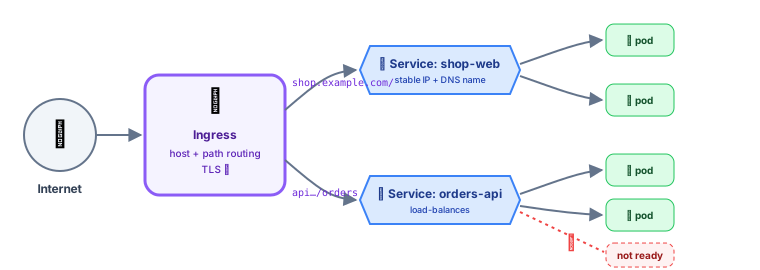 Ingress routes outside HTTP traffic to Services, which load-balance across pods
Why Services exist
- Pod IPs change every time a pod is recreated.
- A Service gets a stable virtual IP and DNS name, and forwards traffic to all ready pods matching its selector.
apiVersion: v1
kind: Service
metadata:
  name: shop-api
spec:
  selector:
    app: shop-api        # send traffic to pods with this label…
  ports:
    - port: 80           # …when someone calls shop-api:80
      targetPort: 3000   # …forward to the container's port 3000
Kubernetes keeps an up-to-date list of matching, ready pod IPs (the EndpointSlices). A pod failing its readiness probe is removed from the list automatically.
Service DNS
Every Service gets a DNS name from CoreDNS:
<service>.<namespace>.svc.cluster.local
shop-api.team-shop.svc.cluster.local
From a pod in the same namespace, just use http://shop-api. From another namespace: http://shop-api.team-shop.
// Inside another pod: no IPs anywhere
const res = await fetch("http://shop-api/products");
Service types
| Type | Reachable from | Use for |
|---|---|---|
| ClusterIP | Inside the cluster only | Service-to-service traffic ✅ (the default) |
| NodePort | <any node IP>:30000-32767 | Development, bare-metal setups |
| LoadBalancer | The internet, via a cloud load balancer | Exposing one service directly (costs one LB each) |
| ExternalName | A DNS alias to an outside host | Pointing to an external database by a cluster name |
Headless (clusterIP: None) | DNS returns individual pod IPs | StatefulSets, where clients need specific pods |
Ingress: HTTP routing into the cluster
One cloud load balancer per service gets expensive and messy. An Ingress lets one entry point route HTTP(S) traffic by host and path to many services, and terminate TLS.
apiVersion: networking.k8s.io/v1
kind: Ingress
metadata:
  name: shop
  annotations:
    cert-manager.io/cluster-issuer: letsencrypt   # automatic HTTPS certificates
spec:
  ingressClassName: nginx
  tls:
    - hosts: [shop.example.com, api.shop.example.com]
      secretName: shop-tls
  rules:
    - host: shop.example.com
      http:
        paths:
          - path: /
            pathType: Prefix
            backend: { service: { name: shop-web, port: { number: 80 } } }
    - host: api.shop.example.com
      http:
        paths:
          - path: /orders
            pathType: Prefix
            backend: { service: { name: orders-api, port: { number: 80 } } }
          - path: /products
            pathType: Prefix
            backend: { service: { name: catalog-api, port: { number: 80 } } }
⚠️ An Ingress resource does nothing by itself. You need an Ingress controller running in the cluster (ingress-nginx, Traefik, HAProxy, or your cloud's controller) to act on it.
cert-manager automatically gets and renews free TLS certificates from Let's Encrypt for your Ingress hosts.
The Gateway API: Ingress, evolved
The newer Gateway API splits responsibilities between roles and supports more features (header matching, traffic splitting for canaries, TCP/gRPC routes) in a standard way.
apiVersion: gateway.networking.k8s.io/v1
kind: HTTPRoute
metadata:
  name: orders
spec:
  parentRefs: [{ name: public-gateway }]
  hostnames: ["api.shop.example.com"]
  rules:
    - matches: [{ path: { type: PathPrefix, value: /orders } }]
      backendRefs:
        - { name: orders-api-v1, port: 80, weight: 90 }
        - { name: orders-api-v2, port: 80, weight: 10 }   # 10% canary
NetworkPolicies: a firewall between pods
By default, every pod can talk to every other pod. NetworkPolicies restrict that (your CNI plugin must support them, e.g. Calico or Cilium).
apiVersion: networking.k8s.io/v1
kind: NetworkPolicy
metadata:
  name: payments-db-only-from-payments
spec:
  podSelector: { matchLabels: { app: payments-db } }
  policyTypes: [Ingress]
  ingress:
    - from:
        - podSelector: { matchLabels: { app: payments-api } }
      ports: [{ port: 5432 }]
Debugging connectivity
kubectl get svc,endpointslices -n team-shop            # does the service have endpoints?
kubectl describe svc shop-api                          # selector matches pod labels?
kubectl run tmp --rm -it --image=busybox:1.36 -- sh    # a throwaway pod…
wget -qO- http://shop-api/health                       # …to test from inside the cluster
kubectl port-forward svc/shop-api 8080:80              # reach it from your laptop
Most "service doesn't work" issues are label mismatches (the selector doesn't match the pod labels, so there are no endpoints) or pods that aren't ready.
Key takeaways
- A Service gives a changing set of pods one stable IP and DNS name, and load-balances across ready pods.
- ClusterIP for internal traffic, LoadBalancer to expose directly, NodePort for simple setups.
- Call services by DNS name:
http://shop-api(same namespace). - Ingress (plus an Ingress controller) routes HTTP by host and path and terminates TLS; the Gateway API is its successor.
- Restrict pod-to-pod traffic with NetworkPolicies; debug by checking endpoints and labels.