Deployments, ReplicaSets & Rollouts
Keep the right number of pods running and ship new versions with zero downtime. Deployments, ReplicaSets, labels and selectors, rolling updates, rollbacks, plus StatefulSets, DaemonSets and Jobs.
The big idea
A shift manager at a call centre is told: "Always have 5 agents on the phones." If an agent goes home sick, the manager calls in a replacement. When a new script is introduced, the manager retrains agents one at a time, so the phones are never unanswered.
A Deployment is that shift manager for your pods.
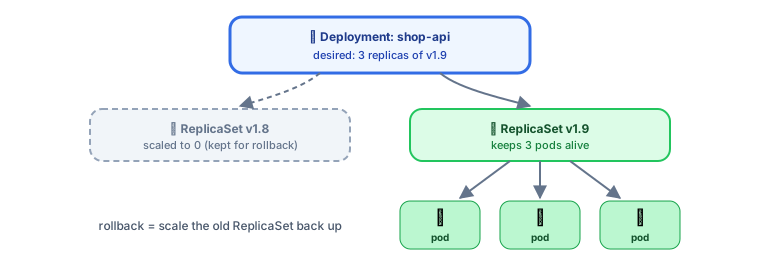 Deployment → ReplicaSet → Pods
Deployment → ReplicaSet → Pods
- A ReplicaSet ensures a fixed number of identical pods exist. A pod dies → it creates a new one.
- A Deployment manages ReplicaSets: each new version gets a new ReplicaSet, and the Deployment shifts pods from old to new.
- You work with Deployments; ReplicaSets are created for you.
A complete Deployment
apiVersion: apps/v1
kind: Deployment
metadata:
  name: shop-api
  labels: { app: shop-api }
spec:
  replicas: 3
  revisionHistoryLimit: 5          # keep 5 old ReplicaSets for rollbacks
  selector:
    matchLabels: { app: shop-api } # which pods belong to this Deployment
  strategy:
    type: RollingUpdate
    rollingUpdate:
      maxSurge: 1                  # at most 1 extra pod during an update
      maxUnavailable: 0            # never go below 3 ready pods
  template:                        # the pod template
    metadata:
      labels: { app: shop-api, version: "1.8.0" }
    spec:
      containers:
        - name: api
          image: registry.example.com/shop-api:1.8.0
          ports: [{ containerPort: 3000 }]
          resources:
            requests: { cpu: 250m, memory: 256Mi }
            limits: { memory: 512Mi }
          readinessProbe:
            httpGet: { path: /health/ready, port: 3000 }
Labels and selectors: how objects find each other
Labels are key/value tags on objects. Selectors pick objects by label. This loose matching is how Deployments find their pods and Services find their endpoints.
kubectl get pods -l app=shop-api
kubectl get pods -l 'app=shop-api,version!=1.7.0'
Rolling updates: zero-downtime deploys ⭐
Change the image, and the Deployment gradually replaces old pods with new ones:
kubectl set image deployment/shop-api api=registry.example.com/shop-api:1.9.0
# or edit the YAML and: kubectl apply -f deployment.yaml
kubectl rollout status deployment/shop-api
With maxSurge: 1, maxUnavailable: 0, Kubernetes starts a new pod, waits until it's ready (its readiness probe passes), then removes an old one, and repeats. Capacity never drops.
⚠️ Without a readiness probe, Kubernetes sends traffic to new pods the moment their container starts, possibly before the app can handle requests. Always add one (see Scaling & Health Probes).
Rollbacks
kubectl rollout history deployment/shop-api
kubectl rollout undo deployment/shop-api                 # back to the previous version
kubectl rollout undo deployment/shop-api --to-revision=3
kubectl rollout pause deployment/shop-api                # pause a rollout mid-way
kubectl rollout resume deployment/shop-api
Because old ReplicaSets are kept (scaled to 0), rolling back is just scaling the old ReplicaSet up again. It takes seconds.
Scaling manually
kubectl scale deployment/shop-api --replicas=10
(For automatic scaling based on load, see the HorizontalPodAutoscaler in Scaling & Health Probes.)
Other workload types
Deployments are for stateless apps where pods are interchangeable. Other controllers handle other shapes of work:
| Workload | Use for | Key behaviour |
|---|---|---|
| Deployment | Stateless apps: APIs, web frontends | Interchangeable pods, rolling updates |
| StatefulSet | Databases, Kafka, ZooKeeper, Elasticsearch | Stable names (db-0, db-1), stable storage per pod, ordered start/stop |
| DaemonSet | One pod on every node: log collectors, monitoring agents, CNI | Adds a pod when a node joins |
| Job | Run to completion once: migrations, batch processing | Retries until it succeeds |
| CronJob | Scheduled jobs: nightly reports, cleanups | Creates Jobs on a cron schedule |
apiVersion: batch/v1
kind: CronJob
metadata:
  name: nightly-report
spec:
  schedule: "0 2 * * *"            # every day at 02:00
  jobTemplate:
    spec:
      backoffLimit: 3
      template:
        spec:
          restartPolicy: OnFailure
          containers:
            - name: report
              image: registry.example.com/reports:2.1.0
              args: ["generate", "--date=yesterday"]
💡 Running databases on Kubernetes (StatefulSets) is possible, but managed databases (RDS, Cloud SQL) are often simpler and safer. Decide deliberately.
Key takeaways
- A Deployment manages ReplicaSets, which keep a fixed number of identical pods running.
- Labels and selectors connect Deployments and Services to their pods.
- Rolling updates replace pods gradually; with readiness probes and
maxUnavailable: 0there's zero downtime. kubectl rollout undorolls back in seconds.- Use StatefulSets for stateful apps, DaemonSets for per-node agents, Jobs/CronJobs for batch work.