Why Kubernetes?
From one container on your laptop to hundreds across many servers. What problems Kubernetes solves, the idea of desired state, and when you do and don't need it.
The big idea
A single musician can play alone. A 100-person orchestra needs a conductor: someone who makes sure every instrument starts on time, replaces a sick violinist, and keeps everyone in sync.
Docker gives you containers (the musicians). Kubernetes (K8s) is the conductor: it decides where each container runs, restarts the ones that crash, scales them up and down, and rolls out new versions without stopping the music.
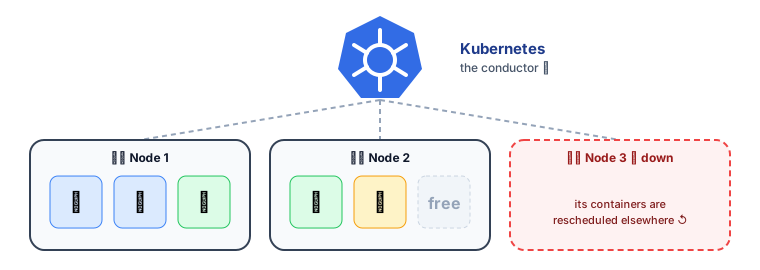 Kubernetes orchestrates containers across a cluster of machines
📘 The name comes from Greek for helmsman (the person steering a ship). "K8s" = K + 8 letters + s. Google open-sourced it in 2014, based on its internal system Borg. It is now run by the Cloud Native Computing Foundation (CNCF).
The problems it solves
Running one container is easy: docker run my-app. Running production is not:
| Problem | Without Kubernetes | With Kubernetes |
|---|---|---|
| A container crashes at 3 a.m. | Someone gets paged, SSHes in, restarts it | Self-healing: restarted automatically |
| A server dies | Manually move its containers elsewhere | Rescheduled onto healthy nodes |
| Traffic spikes 10× | Manually start more copies | Autoscaling adds replicas |
| Deploying a new version | Stop old, start new → downtime | Rolling updates with zero downtime, and rollback |
| "Which server has space?" | Spreadsheets and guesswork | Scheduler places containers by CPU/memory needs |
| Service A needs to find service B | Hard-coded IP addresses | Service discovery and load balancing built in |
| Passwords and config | Baked into images or scattered files | ConfigMaps and Secrets |
The core idea: desired state ⭐
You don't tell Kubernetes how to do things step by step. You declare what you want in YAML ("I want 3 copies of my API, version 1.8"), and Kubernetes continuously works to make reality match.
# "I want 3 replicas of my API, version 1.8"
apiVersion: apps/v1
kind: Deployment
metadata:
  name: shop-api
spec:
  replicas: 3
  selector:
    matchLabels: { app: shop-api }
  template:
    metadata:
      labels: { app: shop-api }
    spec:
      containers:
        - name: api
          image: registry.example.com/shop-api:1.8.0
          ports: [{ containerPort: 3000 }]
kubectl apply -f deployment.yaml # "make it so"
A pod crashes → actual (2) ≠ desired (3) → Kubernetes starts a new one. No human needed. This "control loop" idea powers everything in Kubernetes.
| Imperative (how) | Declarative (what) ✅ |
|---|---|
| "Start container A on server 3" | "There should be 3 copies of A" |
| "Stop version 1, start version 2" | "The version should be 2" |
| Breaks when reality changes | Keeps fixing reality automatically |
Key building blocks (a preview)
| Object | One-line meaning | Lesson |
|---|---|---|
| Pod | The smallest unit: one or more containers running together | Pods |
| Deployment | Keeps N identical pods running; handles rollouts | Deployments |
| Service | A stable name/IP that load-balances across pods | Services & Ingress |
| Ingress | HTTP(S) routing from the internet to services | Services & Ingress |
| ConfigMap / Secret | Configuration and sensitive values | Config & Storage |
| PersistentVolume | Storage that outlives pods | Config & Storage |
| HPA | Autoscaling pods based on load | Scaling & Health |
Do you actually need Kubernetes?
Kubernetes is powerful, and complex. Be honest about your needs (remember KISS).
✅ Good fit: many services, several teams, the need for portability across clouds, strong automation of deploys and scaling.
❌ Probably overkill: a single web app, a small team with no ops experience, a prototype. A PaaS gets you to production faster.
💡 If you do use Kubernetes, use a managed control plane (Amazon EKS, Google GKE, Azure AKS). Running the control plane yourself is a job in itself.
Key takeaways
- Kubernetes orchestrates containers across many machines: scheduling, self-healing, scaling, rollouts and discovery.
- You declare desired state in YAML; control loops keep reality matching it.
- Core objects: Pods, Deployments, Services, Ingress, ConfigMaps/Secrets, volumes, autoscalers.
- It's powerful but complex. Use it when the scale and team justify it, preferably managed.