Frontend Performance & Core Web Vitals
Make pages load fast and feel instant. Understand LCP, INP and CLS, then apply the proven fixes, from image optimisation and code splitting to caching and virtualisation.
The big idea
Users judge speed by feel, not by a stopwatch:
- "Is it loading?" Something meaningful appears quickly.
- "Can I use it?" Clicks and typing respond instantly.
- "Is it stable?" Things don't jump around while I read.
Google measures exactly these three feelings with the Core Web Vitals.
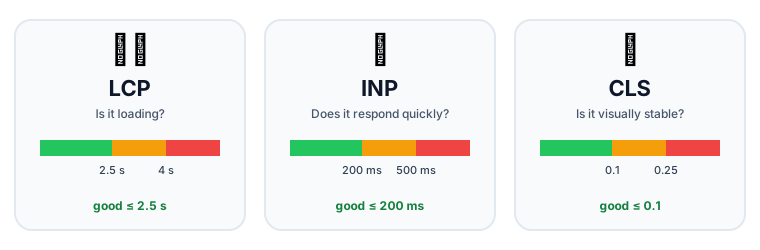 The three Core Web Vitals and their "good" thresholds
| Metric | Measures | Good | Poor |
|---|---|---|---|
| LCP: Largest Contentful Paint | When the biggest visible element (hero image, headline) has rendered | ≤ 2.5 s | > 4 s |
| INP: Interaction to Next Paint | How quickly the page responds to clicks, taps and key presses | ≤ 200 ms | > 500 ms |
| CLS: Cumulative Layout Shift | How much visible content jumps around unexpectedly | ≤ 0.1 | > 0.25 |
💡 Measure with Lighthouse and Chrome DevTools (lab data) and with real-user data: PageSpeed Insights, the
web-vitalslibrary or your analytics. Real users on slow phones matter most.
Fixing LCP: show the main content sooner
1. Optimise images (usually the LCP element)
<!-- ✅ Modern format, right size, loaded with high priority -->
<img
  src="/hero-1200.avif"
  srcset="/hero-600.avif 600w, /hero-1200.avif 1200w"
  sizes="(max-width: 600px) 600px, 1200px"
  width="1200" height="600"
  fetchpriority="high"
  alt="New keyboards on a desk"
/>
In Next.js, <Image src={hero} priority alt="…" /> does this for you (resizing, AVIF/WebP, srcset, lazy loading).
| Do | Why |
|---|---|
| Use AVIF/WebP | 30–50% smaller than JPEG |
| Serve the right size | Don't send a 4000px image to a 400px phone |
fetchpriority="high" on the hero | Browser fetches it first |
| Don't lazy-load the hero | Lazy-load only below-the-fold images |
| Use a CDN | Serve from a location near the user |
2. Faster server response (TTFB): cache HTML at the edge (SSG/ISR), use a CDN, speed up slow queries.
3. Remove render blockers: inline critical CSS, defer scripts, and preload key fonts with font-display: swap.
<link rel="preload" href="/fonts/inter.woff2" as="font" type="font/woff2" crossorigin />
<link rel="preconnect" href="https://cdn.example.com" />
Fixing INP: keep the main thread free
INP gets worse when long JavaScript tasks (> 50 ms) block the main thread: the browser can't respond to a click until the current task finishes.
Fixes:
- Ship less JavaScript: code-split, remove unused libraries, keep work in Server Components.
- Break up long tasks: yield to the browser between chunks (
await scheduler.yield()orsetTimeout). - Move heavy work off the main thread: Web Workers for parsing, image processing, big calculations.
- Make urgent updates urgent: in React, wrap non-urgent updates in
startTransitionso typing stays responsive. - Debounce expensive handlers (search as you type).
const [query, setQuery] = useState("");
const [isPending, startTransition] = useTransition();

function onChange(e) {
  setQuery(e.target.value);                       // urgent: update the input now
  startTransition(() => setFilter(e.target.value)); // non-urgent: filter 10,000 rows later
}
Fixing CLS: stop things jumping
- Always set
widthandheight(oraspect-ratio) on images, videos and iframes. - Reserve space for ads, embeds and banners.
- Use
font-display: swapwith a well-matched fallback font (Next.jsnext/fontdoes this). - Don't insert content above existing content (except in response to a user action).
Code splitting: load only what's needed
import { lazy, Suspense } from "react";
const ChartEditor = lazy(() => import("./ChartEditor")); // separate chunk

<Suspense fallback={<Spinner />}>
  {showEditor && <ChartEditor />}
</Suspense>

// Next.js
const Map = dynamic(() => import("./Map"), { ssr: false, loading: () => <MapSkeleton /> });
Next.js already splits every route automatically. Check what's in your bundles with @next/bundle-analyzer, and watch out for heavy libraries (moment.js, all of lodash, huge icon packs).
Rendering performance in React
| Problem | Fix |
|---|---|
| Re-rendering big subtrees on every keystroke | Move state down (closer to where it's used); split components |
| Expensive child re-renders with the same props | React.memo + stable props (useCallback / useMemo), or the React Compiler |
| Rendering 10,000 rows | Virtualisation: render only the ~20 visible rows (TanStack Virtual, react-window) |
| Context updates re-render everything | Split contexts, or use a store with selectors |
💡 Measure before optimising. Use the React DevTools Profiler to find components that actually render slowly. Guessing leads to
useMemoeverywhere and no real gain.
Caching and network
- HTTP caching:
Cache-Control: public, max-age=31536000, immutablefor hashed static files (app.3f9a1c.js); short orno-cachefor HTML. - CDN for static assets and cacheable pages.
- Compression: Brotli or gzip for text files.
- HTTP/2 and HTTP/3: many files over one connection.
- Prefetch the likely next page (Next.js
<Link>does this automatically).
A performance budget
Set limits and check them in CI so performance doesn't slowly decay:
| Budget | Target |
|---|---|
| JavaScript (compressed) on first load | < 170 KB |
| LCP (p75, mobile) | < 2.5 s |
| INP (p75) | < 200 ms |
| CLS (p75) | < 0.1 |
Key takeaways
- Core Web Vitals: LCP (loading), INP (responsiveness), CLS (stability).
- LCP: optimise and prioritise the hero image, reduce TTFB, remove render blockers.
- INP: ship less JS, break up long tasks, use Web Workers and transitions.
- CLS: reserve space with width/height or aspect-ratio for all media and embeds.
- Code-split, virtualise long lists, and profile before memoising.