How Browsers Render a Page
From HTML text to pixels on screen. The critical rendering path (DOM, CSSOM, layout, paint, composite) and why it matters for fast, smooth pages.
The big idea
Building a page is like building a house:
- Read the blueprint (HTML) → know which rooms exist (DOM).
- Read the interior design notes (CSS) → know the colours and sizes (CSSOM).
- Combine them into a plan of what's actually visible (render tree).
- Measure where every wall goes (layout).
- Paint the walls (paint).
- Stack the floors together (composite).
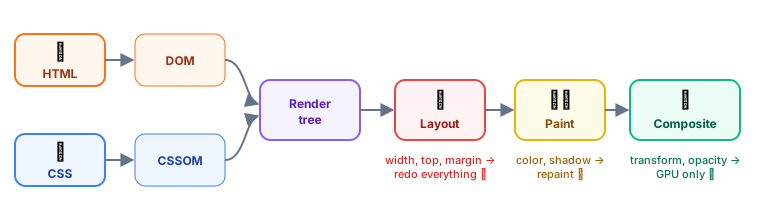 The critical rendering path: from HTML and CSS to pixels
Step by step
1. HTML → DOM
The browser reads HTML top to bottom and builds the Document Object Model, a tree of nodes that JavaScript can read and change.
<body>
  <header><h1>Shop</h1></header>
  <main><p>Hello <b>Ana</b></p></main>
</body>
2. CSS → CSSOM
CSS is parsed into its own tree. CSS is render-blocking: the browser won't paint anything until it has the CSS, to avoid showing unstyled content that then jumps around.
3. Render tree
DOM + CSSOM combined, but only visible elements. display: none elements, <head> and <script> are left out. (visibility: hidden elements are included: they take space but are invisible.)
4. Layout (reflow)
The browser calculates the exact position and size of every box, based on the viewport width, fonts, padding and so on.
5. Paint
Fill in the pixels: text, colours, borders, shadows, images.
6. Composite
Some elements get their own layers (for example, elements with transform or opacity animations, or will-change). The GPU stacks these layers into the final image.
JavaScript can block everything
When the parser meets a normal <script>, it stops building the DOM, downloads and runs the script, then continues.
| Attribute | Downloads | Runs | Order kept? | Use for |
|---|---|---|---|---|
| (none) | Blocks parsing | Immediately | ✅ | Avoid in <head> |
defer | In parallel | After HTML is parsed | ✅ | Your app scripts ✅ |
async | In parallel | As soon as downloaded | ❌ | Independent scripts (analytics) |
type="module" | In parallel | Deferred by default | ✅ | Modern ES modules |
<script src="/app.js" defer></script>
<script src="https://analytics.example.com/a.js" async></script>
Reflow and repaint: why some changes are expensive
After the first render, every change to the page may redo part of the pipeline:
| You change… | Pipeline steps redone | Cost |
|---|---|---|
width, height, top, margin, font size, adding elements | Layout → Paint → Composite | 🔴 Expensive |
color, background, box-shadow, visibility | Paint → Composite | 🟡 Medium |
transform, opacity | Composite only | 🟢 Cheap |
💡 Animate only
transformandopacity. Moving a box withtransform: translateX(100px)runs smoothly on the GPU; moving it withleft: 100pxforces layout on every frame.
/* ❌ Janky: triggers layout 60 times per second */
.menu { transition: left 0.3s; }
.menu.open { left: 0; }

/* ✅ Smooth: compositor only */
.menu { transition: transform 0.3s; transform: translateX(-100%); }
.menu.open { transform: translateX(0); }
Layout thrashing
Reading a layout value (offsetHeight, getBoundingClientRect()) right after writing styles forces the browser to calculate layout immediately. In a loop, that's a disaster.
// ❌ Read-write-read-write: forces layout on every iteration
for (const box of boxes) {
  box.style.width = container.offsetWidth / 2 + "px";
}

// ✅ Read once, then write
const half = container.offsetWidth / 2;
for (const box of boxes) box.style.width = half + "px";
60 frames per second
To feel smooth, the browser draws a new frame every 16.7 ms (60 fps). Your JavaScript, style calculations, layout and paint must all fit in that budget.
A long task (for example, 200 ms of JavaScript) freezes the page: clicks don't respond and animations stutter. That's what the INP metric measures (see Frontend Performance).
Key takeaways
- HTML → DOM, CSS → CSSOM, combined into a render tree, then layout, paint, composite.
- CSS blocks rendering; plain scripts block parsing. Use
deferorasync. - Changing geometry triggers expensive layout;
transformandopacityare cheap. - Batch DOM reads and writes to avoid layout thrashing.
- You have ~16 ms per frame for smooth 60 fps.