State Management (Redux, Zustand, TanStack Query)
Where should data live in a frontend app? Learn the four kinds of state, when local state is enough, and how Redux Toolkit, Zustand and TanStack Query each help.
The big idea
Not all data is the same. Think of a household:
- Your pocket 👖: things only you need right now (a note) → local state.
- The family whiteboard 📋: things everyone at home needs (the shopping list) → global client state.
- The bank 🏦: the real source of truth lives elsewhere; you just keep a recent copy → server state.
- The house address 🏠: where you are right now → URL state.
The biggest mistake is putting everything in one global store.
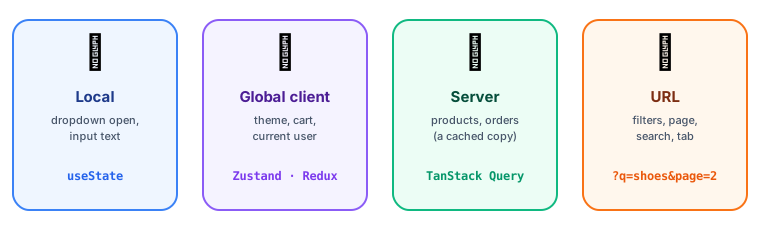 Four kinds of state and where each belongs
| Kind | Examples | Best tool |
|---|---|---|
| Local UI state | Is this dropdown open? Form input text | useState, useReducer |
| Global client state | Theme, logged-in user, shopping cart, sidebar open | Context, Zustand, Redux Toolkit |
| Server state | Products, orders, user profiles from the API | TanStack Query, SWR, RTK Query |
| URL state | Current page, filters, search query, selected tab | The router (?q=shoes&page=2) |
Start local, lift only when needed
Server state: TanStack Query ⭐
About 80% of "global state" in typical apps is really cached server data. It has special needs: loading and error states, caching, background refetching, deduplication, retries and invalidation after mutations. Don't hand-roll that with useEffect + useState.
import { useQuery, useMutation, useQueryClient } from "@tanstack/react-query";

function Products() {
  const { data, isPending, error } = useQuery({
    queryKey: ["products", { category: "keyboards" }],
    queryFn: () => api.getProducts({ category: "keyboards" }),
    staleTime: 60_000, // treat data as fresh for 1 minute
  });

  if (isPending) return <Spinner />;
  if (error) return <ErrorMessage error={error} />;
  return <ProductGrid products={data} />;
}

function AddProductButton() {
  const queryClient = useQueryClient();
  const mutation = useMutation({
    mutationFn: api.createProduct,
    onSuccess: () => queryClient.invalidateQueries({ queryKey: ["products"] }), // refetch lists
  });
  return <button onClick={() => mutation.mutate({ name: "New" })}>Add</button>;
}
Global client state: Zustand (simple)
Zustand is a tiny store with almost no boilerplate.
import { create } from "zustand";

export const useCartStore = create((set) => ({
  items: [],
  add: (product) => set((state) => ({ items: [...state.items, product] })),
  remove: (id) => set((state) => ({ items: state.items.filter((i) => i.id !== id) })),
  clear: () => set({ items: [] }),
}));

// Any component, no Provider needed. Select only what you use to avoid extra renders:
const count = useCartStore((state) => state.items.length);
const add = useCartStore((state) => state.add);
Global client state: Redux Toolkit (structured)
Redux is the classic, predictable pattern: one store, state changed only by dispatching actions handled by pure reducers.
Redux Toolkit (RTK) is the modern, official way to write Redux, with far less boilerplate:
import { createSlice, configureStore } from "@reduxjs/toolkit";

const cartSlice = createSlice({
  name: "cart",
  initialState: { items: [] },
  reducers: {
    add(state, action) {
      state.items.push(action.payload); // looks like mutation; Immer makes it immutable
    },
    remove(state, action) {
      state.items = state.items.filter((i) => i.id !== action.payload);
    },
  },
});

export const { add, remove } = cartSlice.actions;
export const store = configureStore({ reducer: { cart: cartSlice.reducer } });
const items = useSelector((state) => state.cart.items);
const dispatch = useDispatch();
<button onClick={() => dispatch(add(product))}>Add</button>
Redux shines in large apps with complex shared state and many developers: strict conventions, excellent DevTools (time-travel debugging) and middleware. RTK Query adds server-state caching, similar to TanStack Query.
Comparison
| Context | Zustand | Redux Toolkit | TanStack Query | |
|---|---|---|---|---|
| For | Rarely changing values | Client state | Complex client state | Server state |
| Boilerplate | Low | Very low | Medium | Low |
| Re-render control | ❌ All consumers | ✅ Selectors | ✅ Selectors | ✅ Per query |
| DevTools | ❌ | ✅ | ✅✅ | ✅ |
| Learning curve | Easy | Easy | Medium | Medium |
URL state: often forgotten
Filters, search terms, pagination and tabs belong in the URL: they survive a refresh, can be bookmarked and shared, and the back button just works.
// Next.js App Router
const searchParams = useSearchParams();
const router = useRouter();
const category = searchParams.get("category") ?? "all";

function setCategory(next) {
  const params = new URLSearchParams(searchParams);
  params.set("category", next);
  router.push(`?${params}`);
}
Common mistakes
- Copying server data into Redux/Zustand, then fighting to keep it fresh. Use a server-state library.
- One giant store for everything, including "is this modal open".
- Storing derived data (totals, filtered lists) instead of computing it.
- Putting fast-changing values in Context, which re-renders every consumer.
Key takeaways
- Separate the four kinds of state: local, global client, server, URL.
- Start with local state; lift it up; go global only when truly needed.
- Server data → TanStack Query / SWR / RTK Query (caching, refetching, deduplication).
- Small global state → Zustand. Large, complex, team-heavy apps → Redux Toolkit.
- Filters and pagination belong in the URL.