React Fundamentals
Components, props, state and the virtual DOM. Learn to think in React, with a picture of how renders and reconciliation actually work.
The big idea
A UI built with React is like LEGO: small, reusable bricks (components) snap together into bigger ones, and the bigger ones form the whole page.
And React's core idea fits in one line:
🎯 UI = f(state). You describe what the screen should look like for the current data. When the data changes, React updates the screen for you.
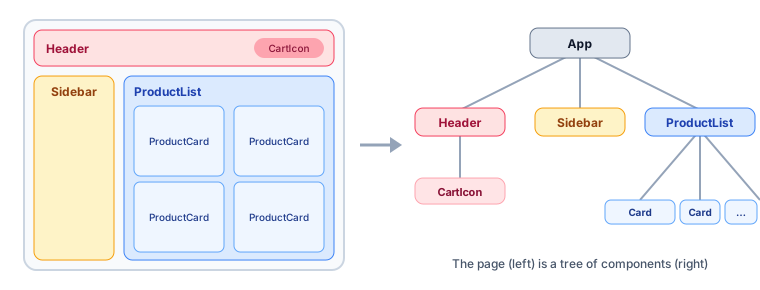 A page broken into a tree of components
Components and JSX
A component is a function that returns JSX, an HTML-like syntax for describing UI.
function ProductCard({ name, price, imageUrl, onAdd }) {
  return (
    <article className="card">
      <img src={imageUrl} alt={name} />
      <h3>{name}</h3>
      <p>${price.toFixed(2)}</p>
      <button onClick={onAdd}>Add to cart</button>
    </article>
  );
}
JSX is just JavaScript underneath: <h3>{name}</h3> compiles to a function call like jsx("h3", { children: name }).
JSX rules: return one root element (or a fragment <>…</>), use className instead of class, write {expression} for JavaScript values, and close every tag (<img />).
Props: data flows down
Props are a component's inputs, passed from parent to child, and read-only for the child.
function ProductList({ products, onAdd }) {
  return (
    <div className="grid">
      {products.map((p) => (
        <ProductCard key={p.id} {...p} onAdd={() => onAdd(p.id)} />
      ))}
    </div>
  );
}
Data flows down (props); events flow up (callbacks). This one-way flow makes apps predictable.
💡 Always give list items a stable
key(like a database ID). Keys tell React which item is which between renders. Using the array index as the key causes bugs when items are reordered or removed.
State: data that changes
State is a component's memory. When state changes, React re-renders that component (and its children).
import { useState } from "react";

function Counter() {
  const [count, setCount] = useState(0);

  return (
    <div>
      <p>You clicked {count} times</p>
      <button onClick={() => setCount(count + 1)}>+1</button>
      <button onClick={() => setCount(0)}>Reset</button>
    </div>
  );
}
State rules
- Never mutate state directly. Create a new value.
// ❌ React won't notice
cart.items.push(product);
setCart(cart);

// ✅ New object and new array
setCart({ ...cart, items: [...cart.items, product] });
- Use the updater form when the next state depends on the previous one:
setCount((c) => c + 1); // always uses the latest value
- Keep state minimal. Derive everything you can during render.
// ❌ Duplicated state that can get out of sync
const [items, setItems] = useState([]);
const [total, setTotal] = useState(0);

// ✅ Derived value
const total = items.reduce((sum, item) => sum + item.price * item.qty, 0);
Virtual DOM and reconciliation
Updating the real DOM is relatively slow. React keeps a lightweight copy (the virtual DOM), compares the new version with the previous one (diffing), and applies only the minimal changes.
Diffing shortcuts React uses:
- Different element type (
<div>→<section>) → throw away the old subtree and build a new one. - Same type → keep the DOM node, update only the changed attributes.
- Lists → match children by
key.
Handling forms
function SignupForm({ onSubmit }) {
  const [email, setEmail] = useState("");
  const isValid = email.includes("@");

  return (
    <form
      onSubmit={(e) => {
        e.preventDefault();
        onSubmit({ email });
      }}
    >
      <label>
        Email
        <input type="email" value={email} onChange={(e) => setEmail(e.target.value)} />
      </label>
      <button disabled={!isValid}>Sign up</button>
    </form>
  );
}
This is a controlled input: React state is the single source of truth for the input's value. For big forms, libraries like React Hook Form keep things fast and tidy.
Conditional rendering
{isLoading && <Spinner />}
{error ? <ErrorMessage error={error} /> : <UserList users={users} />}
{items.length === 0 && <EmptyState />}   // ⚠️ not {items.length && …}, which renders "0"
Thinking in React: 5 steps
Where should state live? In the closest common parent of all components that need it. If two siblings need the same data, lift the state up to their parent.
Key takeaways
- Components are reusable functions returning JSX; UI = f(state).
- Props flow down and are read-only; events flow up through callbacks.
- State is component memory; never mutate it, and derive what you can.
- React diffs a virtual DOM and patches only what changed; stable
keys matter. - Put state in the closest common parent that needs it.