Frontend Testing Strategy
What to test and how. The testing trophy, unit tests with Vitest, component tests with Testing Library, API mocking with MSW, and end-to-end tests with Playwright.
The big idea
A car factory tests at several levels: each bolt (unit), each engine (integration), and finally a test drive of the whole car (end-to-end). Each level catches different problems, at a different cost.
🎯 "Write tests. Not too many. Mostly integration." (Guillermo Rauch)
🎯 "The more your tests resemble the way your software is used, the more confidence they can give you." (Kent C. Dodds)
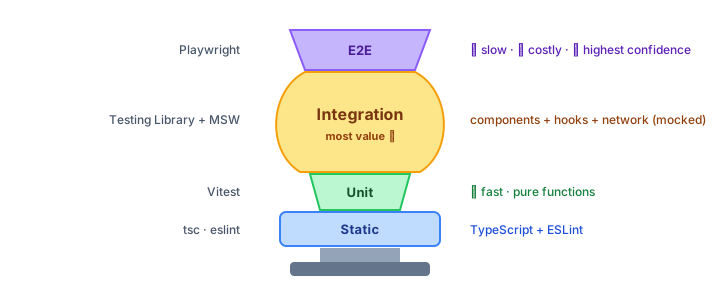 The testing trophy: most value comes from integration tests
| Layer | Tests | Tools | Speed | Confidence |
|---|---|---|---|---|
| Static | Types and lint errors | TypeScript, ESLint | ⚡⚡⚡ | Catches typos and type bugs |
| Unit | One function in isolation | Vitest / Jest | ⚡⚡ | Logic is correct |
| Integration / component ⭐ | Components working together, as a user sees them | Testing Library + MSW | ⚡ | Features work |
| End-to-end | The real app in a real browser | Playwright / Cypress | 🐢 | Critical user journeys work |
Unit tests: pure logic
Best for pure functions: formatters, calculations, validation, reducers.
// cart.ts
export function cartTotal(items: { price: number; qty: number }[], discount = 0) {
  const subtotal = items.reduce((sum, item) => sum + item.price * item.qty, 0);
  return Math.round(subtotal * (1 - discount) * 100) / 100;
}
// cart.test.ts
import { describe, it, expect } from "vitest";
import { cartTotal } from "./cart";

describe("cartTotal", () => {
  it("adds price × quantity for every item", () => {
    expect(cartTotal([{ price: 10, qty: 2 }, { price: 5, qty: 1 }])).toBe(25);
  });

  it("applies a discount", () => {
    expect(cartTotal([{ price: 100, qty: 1 }], 0.1)).toBe(90);
  });

  it("returns 0 for an empty cart", () => {
    expect(cartTotal([])).toBe(0);
  });
});
Arrange → Act → Assert: set up the data, run the code, check the result. One behaviour per test, with a name that reads like a sentence.
Component tests with Testing Library ⭐
Testing Library renders a component and lets you interact with it the way a user does: find elements by their visible text and role, click, type, and check what appears.
// LoginForm.test.tsx
import { render, screen } from "@testing-library/react";
import userEvent from "@testing-library/user-event";
import { LoginForm } from "./LoginForm";

it("shows an error when the password is too short", async () => {
  const user = userEvent.setup();
  render(<LoginForm onSubmit={vi.fn()} />);

  await user.type(screen.getByLabelText(/email/i), "ana@mail.com");
  await user.type(screen.getByLabelText(/password/i), "123");
  await user.click(screen.getByRole("button", { name: /log in/i }));

  expect(screen.getByRole("alert")).toHaveTextContent(/at least 8 characters/i);
});

it("submits valid credentials", async () => {
  const user = userEvent.setup();
  const onSubmit = vi.fn();
  render(<LoginForm onSubmit={onSubmit} />);

  await user.type(screen.getByLabelText(/email/i), "ana@mail.com");
  await user.type(screen.getByLabelText(/password/i), "correct-horse");
  await user.click(screen.getByRole("button", { name: /log in/i }));

  expect(onSubmit).toHaveBeenCalledWith({ email: "ana@mail.com", password: "correct-horse" });
});
Query priority: find elements like a user
getByRole also checks accessibility for free: if a screen reader can't find your button, neither can your test.
Test behaviour, not implementation
| ❌ Implementation details (brittle) | ✅ Behaviour (robust) |
|---|---|
"state isOpen is true" | "the menu items are visible" |
"handleClick was called" | "the counter shows 1" |
Find by CSS class .btn-primary | Find by role "button" named "Save" |
| Snapshot of the whole DOM | Specific assertions on what matters |
Tests that check behaviour survive refactors; tests that check internals break every time you change code, even when nothing is actually broken.
Mock the network, not your code: MSW
Mock Service Worker intercepts fetch requests at the network level. Your components, hooks and data libraries run for real; only the server is fake.
// mocks/handlers.ts
import { http, HttpResponse } from "msw";

export const handlers = [
  http.get("/api/products", () =>
    HttpResponse.json([{ id: 1, name: "Keyboard", price: 49.99 }]),
  ),
  http.post("/api/cart", () => new HttpResponse(null, { status: 201 })),
];
it("lists products from the API", async () => {
  render(<ProductsPage />);
  expect(await screen.findByText("Keyboard")).toBeInTheDocument(); // findBy waits for async UI
});

it("shows an error when the API fails", async () => {
  server.use(http.get("/api/products", () => new HttpResponse(null, { status: 500 })));
  render(<ProductsPage />);
  expect(await screen.findByRole("alert")).toHaveTextContent(/something went wrong/i);
});
The same handlers can power local development and Storybook: one set of mocks for everything.
End-to-end tests with Playwright
E2E tests drive a real browser against the running app. They're slower and more fragile, so keep them for critical journeys: sign up, log in, checkout, payment.
// e2e/checkout.spec.ts
import { test, expect } from "@playwright/test";

test("a customer can buy a keyboard", async ({ page }) => {
  await page.goto("/");
  await page.getByRole("link", { name: "Keyboards" }).click();
  await page.getByRole("button", { name: "Add Keyboard to cart" }).click();
  await page.getByRole("link", { name: /cart \(1\)/i }).click();
  await page.getByRole("button", { name: "Checkout" }).click();

  await page.getByLabel("Card number").fill("4242 4242 4242 4242");
  await page.getByRole("button", { name: "Pay" }).click();

  await expect(page.getByRole("heading", { name: "Thank you for your order" })).toBeVisible();
});
Playwright auto-waits for elements, runs Chromium, Firefox and WebKit, records traces and videos of failures, and runs tests in parallel.
Other useful test types
| Type | Catches | Tools |
|---|---|---|
| Visual regression | Unintended style changes | Playwright screenshots, Chromatic |
| Accessibility | Missing labels, poor contrast | axe-core, jest-axe, Playwright + axe |
| Performance | Slow pages, big bundles | Lighthouse CI, bundle size checks |
| Contract | Frontend and API disagreeing on shapes | Pact, shared schemas (OpenAPI / Zod) |
A practical CI pipeline
Fast checks run first, so most mistakes fail within a minute.
What NOT to test
- Third-party libraries (React, the router): they have their own tests.
- Trivial code with no logic (a component that only renders props).
- Exact CSS or implementation details.
- Aiming for 100% coverage: coverage shows what isn't tested, not what's well tested. Target the risky, valuable paths.
Key takeaways
- Follow the testing trophy: static checks, some unit tests, mostly integration tests, a few E2E tests.
- Test behaviour the way users interact: roles, labels and visible text.
- Mock the network (MSW), not your own modules.
- Keep E2E tests (Playwright) for critical journeys like checkout.
- Run fast checks first in CI; don't chase 100% coverage.