React Hooks in Practice
useState, useEffect, useRef, useMemo, useCallback, useContext and custom hooks. When to use each, the rules of hooks, and the mistakes that cause infinite loops.
The big idea
Hooks are special abilities you can plug into a function component: memory (useState), side effects (useEffect), references to DOM nodes (useRef) and more. They let small functions do what used to require classes.
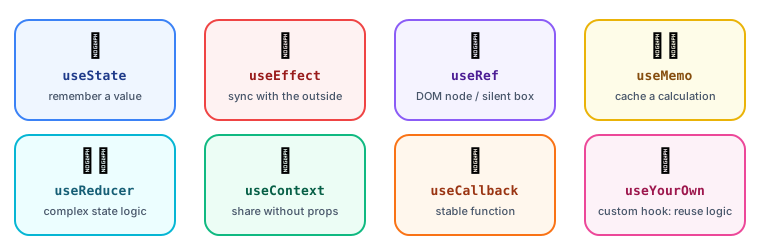 Which hook do I need?
The two rules of hooks
- Only call hooks at the top level of a component or custom hook: never inside
if, loops or nested functions. - Only call hooks from React functions (components or custom hooks).
Why? React identifies each hook by its call order. If a hook is sometimes skipped, the order shifts and every hook after it gets the wrong data.
// ❌ Conditional hook: order changes between renders
if (user) {
  const [name, setName] = useState(user.name);
}

// ✅ Always call it; put the condition inside
const [name, setName] = useState(user?.name ?? "");
useState: memory
const [todos, setTodos] = useState([]);
const [filter, setFilter] = useState("all");

// Lazy initial value: the function runs only on the first render
const [settings, setSettings] = useState(() => JSON.parse(localStorage.getItem("settings") ?? "{}"));
For complex state with many transitions, useReducer keeps the logic in one place (it's the State pattern!):
function cartReducer(state, action) {
  switch (action.type) {
    case "add": return { ...state, items: [...state.items, action.item] };
    case "remove": return { ...state, items: state.items.filter((i) => i.id !== action.id) };
    case "clear": return { ...state, items: [] };
    default: throw new Error(`Unknown action ${action.type}`);
  }
}

const [cart, dispatch] = useReducer(cartReducer, { items: [] });
dispatch({ type: "add", item });
useEffect: sync with the outside world
useEffect runs after React has painted the screen. Use it to synchronise with things outside React: subscriptions, timers, browser APIs, non-React widgets.
useEffect(() => {
  // setup
  const onResize = () => setWidth(window.innerWidth);
  window.addEventListener("resize", onResize);

  // cleanup: runs before the next effect and on unmount
  return () => window.removeEventListener("resize", onResize);
}, []); // dependency array
| Dependency array | Effect runs… |
|---|---|
| (none) | After every render ⚠️ |
[] | Once after mount (+ cleanup on unmount) |
[userId] | After mount, and whenever userId changes |
Fetching data with an effect (and avoiding race conditions)
function UserProfile({ userId }) {
  const [user, setUser] = useState(null);

  useEffect(() => {
    const controller = new AbortController();
    fetch(`/api/users/${userId}`, { signal: controller.signal })
      .then((r) => r.json())
      .then(setUser)
      .catch((e) => { if (e.name !== "AbortError") console.error(e); });
    return () => controller.abort(); // cancel if userId changes before the response arrives
  }, [userId]);

  return user ? <h2>{user.name}</h2> : <Spinner />;
}
💡 In real apps, use a data-fetching library (TanStack Query, SWR) or framework features (Next.js Server Components). They handle caching, deduplication, retries and race conditions for you.
You might not need an effect
Effects are for external systems. Many effects are unnecessary:
// ❌ Effect + extra state just to derive a value (causes an extra render)
const [fullName, setFullName] = useState("");
useEffect(() => setFullName(`${first} ${last}`), [first, last]);

// ✅ Just calculate it during render
const fullName = `${first} ${last}`;
// ❌ Effect reacting to a user event
useEffect(() => { if (submitted) sendAnalytics(); }, [submitted]);

// ✅ Do it in the event handler
function handleSubmit() { sendAnalytics(); }
The infinite loop
// ❌ Sets state → re-render → new object in deps → effect runs → sets state → …
const options = { page: 1 };
useEffect(() => { fetchData(options).then(setData); }, [options]); // new object every render!

// ✅ Depend on primitive values
useEffect(() => { fetchData({ page }).then(setData); }, [page]);
useRef: a box that doesn't trigger renders
function SearchBox() {
  const inputRef = useRef(null);          // 1. reference a DOM node
  const renderCount = useRef(0);          // 2. mutable value that survives renders
  renderCount.current++;

  return (
    <>
      <input ref={inputRef} />
      <button onClick={() => inputRef.current.focus()}>Focus</button>
    </>
  );
}
useState | useRef | |
|---|---|---|
| Survives re-renders | ✅ | ✅ |
| Changing it re-renders | ✅ | ❌ |
| Use for | Values shown on screen | DOM nodes, timers, previous values |
useMemo and useCallback: remember expensive things
// Remember an expensive calculation until its inputs change
const sortedProducts = useMemo(
  () => products.toSorted((a, b) => a.price - b.price),
  [products],
);

// Remember a function identity (useful when passing it to a memoised child)
const handleAdd = useCallback((id) => addToCart(id), [addToCart]);
⚠️ Don't memoise everything. Memoisation has its own cost. Use it for genuinely expensive calculations, or to keep props stable for
React.memochildren. The React Compiler can now add memoisation automatically.
useContext: skip prop drilling
Passing a prop through 5 layers that don't use it ("prop drilling") is tedious. Context makes a value available to a whole subtree.
const ThemeContext = createContext("light");

function App() {
  const [theme, setTheme] = useState("dark");
  return (
    <ThemeContext.Provider value={theme}>
      <Page />
    </ThemeContext.Provider>
  );
}

function Button() {
  const theme = useContext(ThemeContext); // no props passed through Page!
  return <button className={`btn-${theme}`}>OK</button>;
}
⚠️ Every component using a context re-renders when its value changes. Good for rarely changing values (theme, current user, locale); for fast-changing global state, see State Management.
Custom hooks: reuse logic
Any function starting with use that calls other hooks is a custom hook. It's the main way to share stateful logic between components.
function useLocalStorage(key, initialValue) {
  const [value, setValue] = useState(() => {
    try {
      return JSON.parse(localStorage.getItem(key)) ?? initialValue;
    } catch {
      return initialValue;
    }
  });

  useEffect(() => {
    try { localStorage.setItem(key, JSON.stringify(value)); } catch {}
  }, [key, value]);

  return [value, setValue];
}

// Use it like useState, but persisted
const [theme, setTheme] = useLocalStorage("theme", "light");
function useDebounce(value, delayMs = 300) {
  const [debounced, setDebounced] = useState(value);
  useEffect(() => {
    const id = setTimeout(() => setDebounced(value), delayMs);
    return () => clearTimeout(id);
  }, [value, delayMs]);
  return debounced;
}

const debouncedQuery = useDebounce(query); // search only after typing pauses
Newer hooks worth knowing (React 19)
| Hook | What it does |
|---|---|
useId | Stable unique IDs for accessibility attributes |
useTransition | Mark an update as non-urgent so typing stays responsive |
useDeferredValue | Show a slightly stale value while the new one renders |
useActionState | Handle form actions: pending state, result, errors |
useOptimistic | Show the expected result instantly, before the server confirms |
use | Read a promise or context during render (with Suspense) |
Key takeaways
- Call hooks at the top level, in the same order every render.
useState/useReducerfor memory;useEffectonly to sync with external systems (with cleanup).- Derive values during render instead of syncing them with effects.
useRefholds values that shouldn't trigger renders, including DOM nodes.useMemo/useCallbackfor expensive work or stable props, not everywhere.- Extract reusable logic into custom hooks.