Frontend Security
XSS, CSRF, clickjacking, token storage, CORS and supply-chain risks, explained with pictures. What can go wrong in the browser and how to defend against it.
The big idea
The browser is a shared building: your app, third-party scripts, browser extensions and other websites all live in it. Browser security is about making sure the wrong code can't read or act on your users' data.
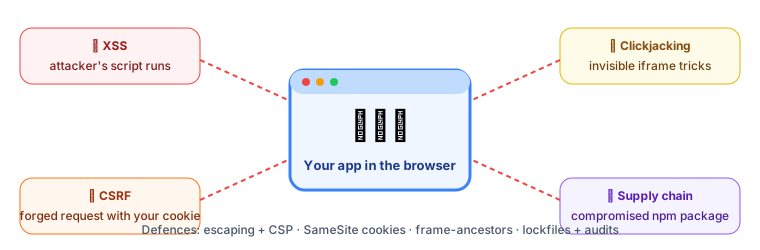 Common frontend attacks at a glance
1. XSS: Cross-Site Scripting ⭐
An attacker gets their JavaScript to run on your page, so it can steal tokens, read the page, or act as the user.
How React protects you (mostly)
React escapes everything you put in {}: <script> becomes harmless text.
const comment = '<img src=x onerror="alert(1)">';
<p>{comment}</p>   // ✅ shown as text, not executed
Where XSS still sneaks in
// ❌ 1. dangerouslySetInnerHTML with user content
<div dangerouslySetInnerHTML={{ __html: userBio }} />

// ✅ Sanitise first
import DOMPurify from "dompurify";
<div dangerouslySetInnerHTML={{ __html: DOMPurify.sanitize(userBio) }} />

// ❌ 2. javascript: URLs
<a href={user.website}>Website</a>   // user.website = "javascript:steal()"

// ✅ Allow only http(s)
const safeUrl = /^https?:\/\//i.test(user.website) ? user.website : "#";

// ❌ 3. Direct DOM APIs
element.innerHTML = userInput;
// ✅
element.textContent = userInput;
Content Security Policy (CSP): the safety net
A CSP header tells the browser which scripts are allowed to run. Even if an attacker injects a <script>, the browser refuses to run it.
Content-Security-Policy:
  default-src 'self';
  script-src 'self' 'nonce-r4nd0m';
  img-src 'self' https://cdn.example.com data:;
  connect-src 'self' https://api.example.com;
  frame-ancestors 'none';
2. CSRF: Cross-Site Request Forgery
You're logged into your bank. You visit an evil site, which silently submits a form to the bank. Your browser automatically attaches your bank cookie, so the bank thinks you made the transfer.
Defences:
| Defence | How it helps |
|---|---|
SameSite=Lax or Strict cookies | The browser doesn't send the cookie on cross-site POSTs (the default in modern browsers is Lax) |
| CSRF tokens | A secret value in the form that evil.com can't know |
Check the Origin header | Reject requests from unexpected origins |
| Tokens in headers instead of cookies | Authorization: Bearer … isn't sent automatically |
3. Where to store tokens?
| Storage | XSS can steal it? | CSRF risk? | Verdict |
|---|---|---|---|
localStorage / sessionStorage | ❌ Yes: any script can read it | No | Avoid for sensitive tokens |
| JS memory (a variable) | Harder (lost on refresh) | No | OK for short-lived access tokens |
HttpOnly + Secure + SameSite cookie | ✅ No: JS can't read it | Mitigated by SameSite | ✅ Recommended for sessions / refresh tokens |
Set-Cookie: session=abc123; HttpOnly; Secure; SameSite=Lax; Path=/; Max-Age=86400
💡 A popular pattern is the BFF (Backend for Frontend): the browser talks only to your own server with an HttpOnly session cookie, and that server holds the real API tokens. Tokens never touch browser JavaScript.
4. CORS: often misunderstood
The Same-Origin Policy stops JavaScript on evil.com from reading responses from api.bank.com. CORS is how a server relaxes that rule for origins it trusts.
- CORS is enforced by the browser. It doesn't protect your API from curl or Postman; it protects your users from other websites.
- ❌ Never combine
Access-Control-Allow-Origin: *with credentials, and never blindly reflect whateverOriginarrives. - ✅ Allow-list exact origins.
5. Clickjacking
An evil page loads your site in an invisible iframe on top of a fake "Win a prize!" button. The user clicks "prize" but actually clicks "Delete account" on your site.
Defence: forbid framing.
Content-Security-Policy: frame-ancestors 'none';
X-Frame-Options: DENY
6. Supply chain: your dependencies
A typical frontend app has 1,000+ npm packages. One compromised package can steal data from every site that uses it.
- Commit your lockfile and use
npm ciin CI. - Run
npm audit, Dependabot or Snyk. - Prefer fewer, well-maintained dependencies.
- Load third-party scripts with Subresource Integrity (SRI):
<script src="https://cdn.example.com/lib.min.js"
        integrity="sha384-oqVuAfXRKap7fdgcCY5uykM6+R9GqQ8K/uxy9rx7HNQlGYl1kPzQho1wx4JwY8wC"
        crossorigin="anonymous"></script>
7. Never trust the frontend
⚠️ Everything in the browser can be changed by the user. Hidden form fields, disabled buttons, client-side validation, prices in JavaScript, "isAdmin" flags: all of it can be edited in DevTools.
Frontend validation is for user experience. The backend must validate and authorise everything again. And never put secrets (API keys with write access, database passwords) in frontend code: they end up in the bundle for anyone to read.
Security headers checklist
| Header | Purpose |
|---|---|
Content-Security-Policy | Limit where scripts, styles and frames can come from |
Strict-Transport-Security | Force HTTPS |
X-Content-Type-Options: nosniff | Stop MIME-type guessing |
Referrer-Policy: strict-origin-when-cross-origin | Don't leak full URLs |
Permissions-Policy | Disable camera, microphone and geolocation unless needed |
Key takeaways
- XSS: never inject unsanitised HTML; avoid
dangerouslySetInnerHTMLandjavascript:URLs; add a CSP. - CSRF: use
SameSitecookies, CSRF tokens and Origin checks. - Store session tokens in HttpOnly, Secure, SameSite cookies, not
localStorage. - CORS relaxes the same-origin policy; allow-list exact origins.
- Block clickjacking with
frame-ancestors; audit dependencies; never trust the client.