Next.js Rendering: CSR, SSR, SSG, ISR & Server Components
Where and when is your HTML created? Compare client-side, server-side, static and incremental rendering, plus React Server Components, with timelines and a decision guide.
The big idea
Getting a meal at a restaurant:
- CSR 🧑🍳 Cook it yourself: the restaurant hands you raw ingredients and a recipe (an empty HTML page + JavaScript). You cook at your table. Slow to start eating.
- SSR 🍝 Cooked to order: the kitchen cooks your meal fresh when you order. Always fresh, but you wait for the kitchen.
- SSG 🥪 Pre-made sandwiches: prepared in the morning, grabbed instantly. Super fast, but only as fresh as the morning.
- ISR 🔄 Pre-made, restocked regularly: sandwiches are remade every few minutes in the background.
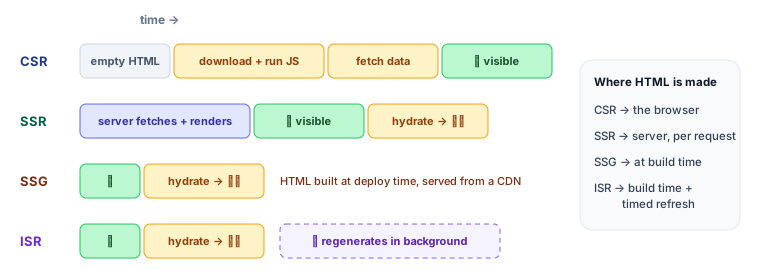 Where the HTML is created in each rendering mode
CSR: Client-Side Rendering
The server sends an almost empty HTML file. The browser downloads JavaScript, runs it, fetches data, then builds the page.
✅ Rich interactivity, cheap hosting (static files). ❌ Slow first paint on slow devices, weak SEO, big bundles.
Good for: dashboards behind a login, admin panels, highly interactive tools.
SSR: Server-Side Rendering
The server runs React for each request, fetches data, and sends complete HTML. Then JavaScript hydrates it (attaches event handlers) to make it interactive.
✅ Fast first content, great SEO, always fresh data. ❌ A server does work on every request; time to first byte depends on data speed.
Good for: personalised pages, search results, frequently changing data.
SSG: Static Site Generation
Pages are rendered once at build time into HTML files and served from a CDN.
✅ Fastest possible, cheapest, very reliable. ❌ Data is only as fresh as the last build; not practical for millions of pages.
Good for: blogs, docs, marketing pages, this learning site's lessons!
ISR: Incremental Static Regeneration
Static pages that refresh themselves in the background after a set time, or on demand.
✅ Static speed with fresh-enough data. Good for: e-commerce product pages, news articles.
Comparison
| CSR | SSR | SSG | ISR | |
|---|---|---|---|---|
| HTML built | In the browser | Per request, on the server | At build time | At build time + background refresh |
| First content | 🐢 Slow | ⚡ Fast | ⚡⚡ Fastest | ⚡⚡ Fastest |
| Data freshness | Live | Live | Build time | Every N seconds |
| SEO | ❌ Weak | ✅ | ✅ | ✅ |
| Server cost | None | Per request | None | Low |
React Server Components (the App Router default)
In the Next.js App Router, components are Server Components by default. They run only on the server, can read the database directly, and send zero JavaScript to the browser.
// app/products/page.tsx — a Server Component (the default)
import { db } from "@/lib/db";
import AddToCartButton from "./AddToCartButton";

export default async function ProductsPage() {
  const products = await db.products.findMany(); // runs on the server, secrets stay safe
  return (
    <ul>
      {products.map((p) => (
        <li key={p.id}>
          {p.name}: ${p.price}
          <AddToCartButton productId={p.id} />
        </li>
      ))}
    </ul>
  );
}
// app/products/AddToCartButton.tsx — a Client Component (interactive)
"use client";
import { useState } from "react";

export default function AddToCartButton({ productId }: { productId: string }) {
  const [added, setAdded] = useState(false);
  return <button onClick={() => setAdded(true)}>{added ? "✓ Added" : "Add to cart"}</button>;
}
| Server Component | Client Component ("use client") | |
|---|---|---|
| Runs | On the server only | Server (for the first HTML) + browser |
| Can use | async/await, DB, secrets, file system | useState, useEffect, event handlers, browser APIs |
| JavaScript sent | None | Yes |
| Use for | Fetching data, static content, layout | Interactivity: buttons, forms, animations |
💡 Keep client components small and at the leaves of the tree. The more stays on the server, the less JavaScript your users download.
Controlling caching in the App Router
// Static (SSG): the default when a page uses no request-specific data
export default async function Page() { /* … */ }

// ISR: regenerate at most every 5 minutes
export const revalidate = 300;

// SSR: render on every request
export const dynamic = "force-dynamic";

// Pre-build known dynamic routes (like this app does for every lesson)
export async function generateStaticParams() {
  return getAllLessons().map((l) => ({ category: l.categorySlug, slug: l.slug }));
}

// On-demand: refresh after a CMS edit or mutation
import { revalidatePath } from "next/cache";
revalidatePath("/products");
Streaming with Suspense
Don't make the whole page wait for the slowest query. Send the fast parts first and stream the rest when ready.
import { Suspense } from "react";

// In Next.js 15+, params is a Promise
export default async function ProductPage({ params }: { params: Promise<{ id: string }> }) {
  const { id } = await params;
  return (
    <>
      <ProductDetails id={id} />               {/* fast: shows immediately */}
      <Suspense fallback={<ReviewsSkeleton />}>
        <Reviews id={id} />                    {/* slow: streams in later */}
      </Suspense>
    </>
  );
}
Which mode should I use?
Real apps mix modes per page: a static marketing homepage, ISR product pages, an SSR search page and a client-heavy dashboard.
Key takeaways
- CSR builds HTML in the browser; SSR per request on the server; SSG at build time; ISR at build time with background refreshes.
- Server Components run only on the server and ship no JS; add
"use client"only where you need interactivity. - Use
revalidate,dynamicandgenerateStaticParamsto choose per page. - Stream slow parts with Suspense so fast content appears first.