MVC, MVP & MVVM
Three patterns for separating what the user sees from the data and logic behind it. How each works, how data flows, and where you meet them in Rails, Express, Angular, Vue and React.
The big idea
A TV news studio:
- The newsroom holds the facts (the Model).
- The TV screen shows them to viewers (the View).
- The producer decides what to show and reacts to phone-ins from viewers (the Controller / Presenter / ViewModel).
Keeping these three apart means you can redesign the screen without rewriting the news, and test the producer's logic without a TV.
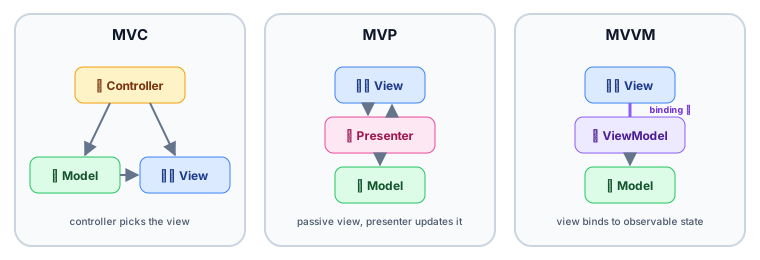 MVC, MVP and MVVM side by side
All three patterns share one goal: separate the UI (View) from data and business logic (Model). They differ in the "middle piece" and in how data flows.
MVC: Model–View–Controller
Invented at Xerox PARC in 1979 for Smalltalk. The most famous of the three.
| Part | Job |
|---|---|
| Model | Data and business rules (Product, Order.total()) |
| View | Displays the model (HTML template, page) |
| Controller | Receives input, updates the model, picks a view |
Server-side MVC (Rails, Laravel, Django, ASP.NET MVC, Express)
// Controller: routes/products.js (Express)
router.get("/products/:id", async (req, res) => {
  const product = await Product.findById(req.params.id); // Model
  if (!product) return res.status(404).render("404");
  res.render("products/show", { product });              // View
});
<!-- View: views/products/show.ejs -->
<h1><%= product.name %></h1>
<p><%= product.formattedPrice() %></p>
⚠️ Fat controller, anaemic model: a common trap is putting all logic in controllers. Keep controllers thin; move business rules into models or services.
MVP: Model–View–Presenter
The View is passive ("dumb"): it just displays what it's told and forwards user events. The Presenter holds all the presentation logic and talks to the View through an interface, which makes it easy to unit-test.
interface LoginView {
  showError(message: string): void;
  goToDashboard(): void;
}

class LoginPresenter {
  constructor(private view: LoginView, private auth: AuthService) {}

  async onLoginClicked(email: string, password: string) {
    if (!email.includes("@")) return this.view.showError("Please enter a valid email");
    const ok = await this.auth.login(email, password);
    ok ? this.view.goToDashboard() : this.view.showError("Wrong email or password");
  }
}

// Test with a fake view: no UI framework needed
const fakeView = { showError: vi.fn(), goToDashboard: vi.fn() };
await new LoginPresenter(fakeView, fakeAuth).onLoginClicked("bad", "x");
expect(fakeView.showError).toHaveBeenCalledWith("Please enter a valid email");
Popular in Android (before Jetpack) and Windows Forms apps.
MVVM: Model–View–ViewModel
The ViewModel exposes observable state and commands. The View binds to them, so when the ViewModel's data changes, the View updates automatically, and user input flows back through the binding. No manual "update the view" calls.
<!-- Vue: the <script setup> part acts as the ViewModel -->
<script setup>
import { ref, computed } from "vue";

const email = ref("");
const password = ref("");
const canSubmit = computed(() => email.value.includes("@") && password.value.length >= 8);
async function login() { await auth.login(email.value, password.value); }
</script>

<template>
  <input v-model="email" />                     <!-- two-way binding -->
  <input v-model="password" type="password" />
  <button :disabled="!canSubmit" @click="login">Log in</button>
</template>
Where you'll find MVVM: Angular, Vue, Knockout, WPF and .NET MAUI, SwiftUI, and Jetpack Compose with ViewModels on Android.
Where does React fit?
React is "just the V", with one-way data flow. In practice, React apps often follow an MVVM-like split using custom hooks as ViewModels:
// ViewModel: all the state and logic, no JSX
function useLoginViewModel() {
  const [email, setEmail] = useState("");
  const [password, setPassword] = useState("");
  const [error, setError] = useState<string | null>(null);
  const canSubmit = email.includes("@") && password.length >= 8;

  async function submit() {
    try { await auth.login(email, password); }
    catch { setError("Wrong email or password"); }
  }
  return { email, setEmail, password, setPassword, error, canSubmit, submit };
}

// View: only rendering
function LoginForm() {
  const vm = useLoginViewModel();
  return (
    <form onSubmit={(e) => { e.preventDefault(); vm.submit(); }}>
      <input value={vm.email} onChange={(e) => vm.setEmail(e.target.value)} />
      <input type="password" value={vm.password} onChange={(e) => vm.setPassword(e.target.value)} />
      {vm.error && <p role="alert">{vm.error}</p>}
      <button disabled={!vm.canSubmit}>Log in</button>
    </form>
  );
}
The hook can be tested with renderHook; the component stays simple. (This is also the "container / presentational" split.)
Comparison
| MVC | MVP | MVVM | |
|---|---|---|---|
| Middle piece | Controller | Presenter | ViewModel |
| View knows… | The model (reads it) | Nothing but the presenter interface | The ViewModel (binds to it) |
| How the View updates | Controller picks/renders a view | Presenter calls view.show…() | Automatic, via data binding |
| Testability of UI logic | Medium | ✅ High | ✅ High |
| Typical home | Server-rendered web apps | Android (classic), WinForms | Angular, Vue, SwiftUI, WPF |
These are UI patterns, not whole-app architectures
MVC/MVP/MVVM organise the presentation part of an app. They don't say where business rules or database access live. In a bigger app, they sit in the outer layer of Clean or Hexagonal architecture:
Key takeaways
- All three separate View (what users see) from Model (data and rules).
- MVC: a controller handles input and picks views. Classic in server-side frameworks.
- MVP: a passive view plus a presenter behind an interface. Very testable.
- MVVM: the view binds to observable state in a ViewModel. The model behind Angular, Vue, SwiftUI.
- In React, custom hooks often play the ViewModel role.
- They're presentation patterns; combine them with Clean/Hexagonal for the rest of the app.