Docker & Containers
Package your app with everything it needs so it runs the same everywhere. Images, containers, Dockerfiles, layers, volumes, networks and Docker Compose, step by step.
The big idea
Before shipping containers existed, loading a cargo ship meant handling sacks, barrels and crates of every shape: slow and chaotic. The standard shipping container changed everything: any cargo, same box, fits every ship, train and truck.
Docker containers do the same for software. Your app, its runtime (Node 22), libraries and config go into one standard box that runs identically on your laptop, a CI server and production.
😩 "But it works on my machine!" → 🐳 "Then we'll ship your machine."
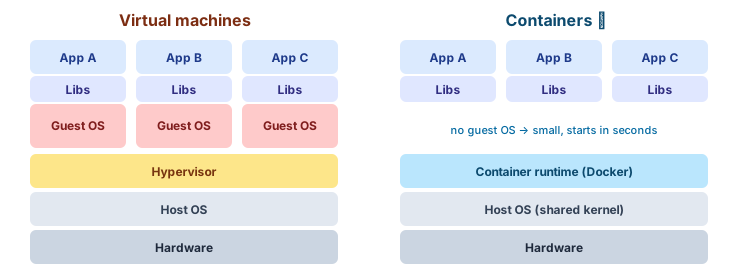 Virtual machines each carry a full operating system; containers share the host kernel
| Virtual machine | Container | |
|---|---|---|
| Contains | Full guest OS + app | Just the app + its dependencies |
| Size | GBs | MBs |
| Starts in | Minutes | Seconds or less |
| Isolation | Strong (separate kernel) | Good (shared kernel, namespaces) |
| Density | ~10s per host | ~100s per host |
Key vocabulary
- Dockerfile: a text recipe describing how to build the image.
- Image: the built, read-only package (like a class).
- Container: a running instance of an image (like an object). You can run many from one image.
- Registry: where images are stored and shared.
A Dockerfile for a Node.js app
# ---- 1. build stage ----
FROM node:22-alpine AS build
WORKDIR /app

# Copy dependency files first to make good use of the layer cache
COPY package.json package-lock.json ./
RUN npm ci

COPY . .
RUN npm run build

# ---- 2. runtime stage: small and secure ----
FROM node:22-alpine
WORKDIR /app
ENV NODE_ENV=production

COPY package.json package-lock.json ./
RUN npm ci --omit=dev

COPY --from=build /app/dist ./dist

# Don't run as root
USER node
EXPOSE 3000
HEALTHCHECK CMD wget -qO- http://localhost:3000/health || exit 1
CMD ["node", "dist/server.js"]
docker build -t shop-api:1.0 .
docker run -d -p 3000:3000 --name api -e DATABASE_URL=postgres://… shop-api:1.0
docker logs -f api
docker exec -it api sh     # open a shell inside the running container
docker stop api && docker rm api
Layers and caching
Each instruction in a Dockerfile creates a layer. Docker reuses unchanged layers, so order matters: put things that change rarely first.
If you COPY . . before npm ci, every code change re-installs all dependencies. Minutes wasted on every build.
Multi-stage builds (above) keep compilers and dev dependencies out of the final image: often 1 GB → 150 MB.
Add a .dockerignore so junk doesn't end up in the image:
node_modules
.git
.env
dist
*.log
Data and networking
Containers are disposable. Anything written inside a container disappears when it's removed. Use volumes for data that must survive.
docker volume create pgdata
docker run -d -v pgdata:/var/lib/postgresql/data -e POSTGRES_PASSWORD=secret postgres:17
| Storage | Use for |
|---|---|
| Named volume | Database files, anything persistent |
Bind mount (-v ./src:/app/src) | Live-reloading code in development |
| tmpfs | Temporary secrets or scratch files in memory |
Containers on the same Docker network can reach each other by name: the API connects to postgres:5432, not an IP address.
Docker Compose: many containers, one file
Real apps need several services. Compose describes them all in YAML and starts them with one command.
# compose.yaml
services:
  api:
    build: .
    ports: ["3000:3000"]
    environment:
      DATABASE_URL: postgres://app:secret@db:5432/shop
      REDIS_URL: redis://cache:6379
    depends_on:
      db: { condition: service_healthy }
      cache: { condition: service_started }

  db:
    image: postgres:17
    environment: { POSTGRES_USER: app, POSTGRES_PASSWORD: secret, POSTGRES_DB: shop }
    volumes: [pgdata:/var/lib/postgresql/data]
    healthcheck:
      test: ["CMD-SHELL", "pg_isready -U app"]
      interval: 5s

  cache:
    image: redis:7-alpine

volumes:
  pgdata:
docker compose up -d        # start everything
docker compose logs -f api  # follow one service
docker compose down         # stop (add -v to delete volumes too)
Best practices
- ✅ Use small, official base images (
-alpine,-slim, distroless) and pin versions (node:22.9-alpine, notlatest). - ✅ Multi-stage builds; copy dependency manifests before source code.
- ✅ Run as a non-root user.
- ✅ One main process per container.
- ✅ Configure through environment variables; never bake secrets into images.
- ✅ Add health checks, and log to stdout/stderr (let the platform collect logs).
- ✅ Scan images for vulnerabilities (
docker scout, Trivy).
From Docker to Kubernetes
Docker runs containers on one machine. When you have dozens of containers across many machines and need auto-restarts, scaling and zero-downtime deploys, you need an orchestrator, and that's Kubernetes (see the Kubernetes lessons).
Key takeaways
- A container packages an app with everything it needs; it runs the same everywhere.
- Dockerfile → image → container. Images live in registries.
- Order Dockerfile instructions for layer caching; use multi-stage builds for small images.
- Containers are disposable: persist data in volumes.
- Docker Compose runs multi-container apps locally with one command.