How a Web Request Works
Follow one click from the browser to the server and back, through DNS, TCP, TLS, HTTP, load balancers, your code and the database.
The big idea
Sending a request is like mailing a letter:
- You know the person's name, but you need their address → DNS turns
shop.cominto an IP address. - You establish a reliable delivery route → TCP connection.
- You put the letter in a sealed envelope → TLS encryption (the "S" in HTTPS).
- You write the letter in a format everyone understands → HTTP.
- Someone at the destination reads it and replies → your server code (often asking a database).
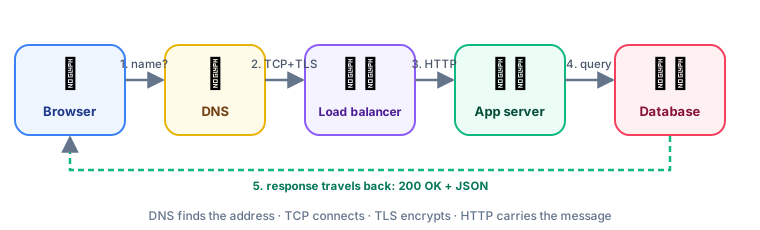 The journey of one HTTP request
Step by step
1. DNS: the internet's phone book
Computers talk using IP addresses (142.250.74.46), but humans remember names (google.com). DNS translates them, with caching at every level: the browser, the OS, your router and your ISP.
2. TCP: a reliable connection
TCP guarantees that data arrives complete and in order, resending lost packets. It starts with a three-way handshake:
3. TLS: the sealed envelope
TLS encrypts everything so nobody in between (Wi-Fi owner, ISP) can read or change it. The server proves its identity with a certificate signed by a trusted authority, which is the padlock 🔒 in your address bar.
4. HTTP: the language of the web
An HTTP request is just text:
GET /products/42 HTTP/1.1
Host: shop.com
Accept: application/json
Authorization: Bearer eyJhbGciOi...
And the response:
HTTP/1.1 200 OK
Content-Type: application/json
Cache-Control: max-age=60

{ "id": 42, "name": "Keyboard", "price": 49.99 }
HTTP methods
| Method | Meaning | Safe? | Idempotent? |
|---|---|---|---|
GET | Read | ✅ | ✅ |
POST | Create / action | ❌ | ❌ |
PUT | Replace | ❌ | ✅ |
PATCH | Partial update | ❌ | ❌* |
DELETE | Remove | ❌ | ✅ |
💡 Idempotent = doing it twice has the same effect as doing it once. Deleting order 42 twice still leaves it deleted. Charging a card twice… is not idempotent! (See REST API Design.)
Status codes by family
| Range | Meaning | Common ones |
|---|---|---|
| 2xx ✅ | Success | 200 OK, 201 Created, 204 No Content |
| 3xx ↪️ | Redirect | 301 Moved Permanently, 304 Not Modified |
| 4xx 🙋 | Client made a mistake | 400 Bad Request, 401 Unauthorized, 403 Forbidden, 404 Not Found, 409 Conflict, 429 Too Many Requests |
| 5xx 💥 | Server failed | 500 Internal Error, 502 Bad Gateway, 503 Unavailable, 504 Gateway Timeout |
5. Your server code
Inside the server, a request typically passes through layers:
// A minimal Node.js (Express) endpoint
app.get("/products/:id", async (req, res) => {
  const product = await productService.getById(req.params.id);
  if (!product) return res.status(404).json({ error: "Product not found" });
  res.set("Cache-Control", "public, max-age=60").json(product);
});
HTTP versions at a glance
| Version | Year | Key idea |
|---|---|---|
| HTTP/1.1 | 1997 | Text protocol, one request at a time per connection |
| HTTP/2 | 2015 | Binary, multiplexing: many requests share one connection |
| HTTP/3 | 2022 | Runs on QUIC (UDP): faster setup, no head-of-line blocking |
Where time goes
A typical 200 ms page request might be spent roughly like this:
That's why we use CDNs (serve from nearby), keep-alive connections (skip handshakes), caching and database indexes. All covered in later lessons.
Key takeaways
- DNS finds the address, TCP makes a reliable connection, TLS encrypts it, HTTP carries the message.
- HTTP methods have meanings: GET reads, POST creates, PUT replaces, PATCH updates, DELETE removes.
- 4xx = the client's fault, 5xx = the server's fault.
- Inside the server: middleware → router → controller → service → database.
- Performance work targets each hop: DNS, handshakes, server time, queries and payload size.